
最准确的 YouTube 播放列表长度计算器,可获取最多 5,000 个视频的播放列表的准确观看时间,且没有 500 个视频的限制。比较多个播放列表,导出为 CSV、PDF 和 JSON,并包含参与度指标和可视化图表。
ViewToolz 是一款免费工具,专为想要准确了解完整观看某个 YouTube 播放列表需要多少时间的人而创建。无论您是正在备考在线认证、学习免费的在线 YouTube 课程、听音乐还是研究内容,我们的工具都能在同一个地方为您提供完整的播放列表分析,让您可以免费查看该播放列表的全部数据。
ViewToolz 不仅显示播放列表的总时长,还会向您展示并帮助您理解整个播放列表的完整数据。我们的工具支持包含多达 5,000 个视频的 YouTube 播放列表,并在同一页面免费并排比较多个播放列表,计算不同播放速度下的观看时间,识别无法播放的视频,并允许您以五种不同格式免费导出结果。
ViewToolz 使用通过官方 YouTube Data API v3 获取的所有公开可用的播放列表信息。使用这种方法有助于我们的工具确保结果与 YouTube 上的最新信息保持同步。
| 功能 | 详情 |
|---|---|
| 最大播放列表大小 | 5,000 个视频 |
| 播放列表比较 | 多达 5 个播放列表 |
| 导出格式 | CSV、PDF、JSON、TXT、复制摘要 |
| 登录 | 无需登录 |
| 数据源 | 官方 YouTube Data API v3 |
| 播放速度 | 支持 |
| 缺失视频 | 是,显示缺失视频 |
| 每日观看计划 | 带有自定义图表的观看时间分析器 |
| 播放列表性能分析 | 总播放量、点赞数、评论数 |
| 排序选项 | 包含 7 个免费排序选项 |
| 支持哪些类型的播放列表 | 所有类型,包括音乐、普通视频,更重要的是还支持 YouTube 播客。 |
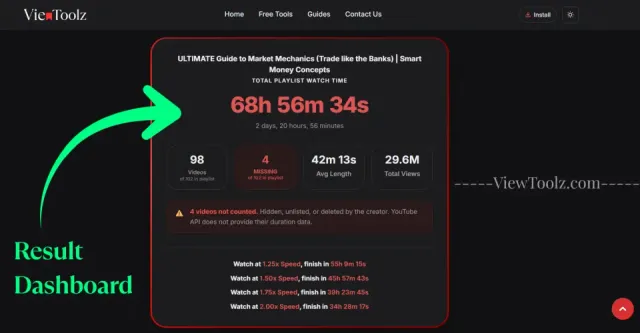
"在此处插入完整结果信息中心的屏幕截图"
ViewToolz 旨在简化所有操作流程。您无需创建任何帐户、安装任何软件或手动逐个添加视频的时长。只需粘贴公开的 YouTube 播放列表 URL,计算器就会帮您完成一切工作。
计算器获取公开可用的播放列表信息。一旦分析完成,您将收到一份详细报告,其中包含总观看时间、播放速度估计、播放列表统计信息、无法播放的视频、导出选项等许多内容。
打开您要分析的 YouTube 播放列表,并从浏览器中复制其 URL。

"复制播放列表 URL"
将复制的 URL 粘贴到计算器页面上的 ViewToolz 输入框中。
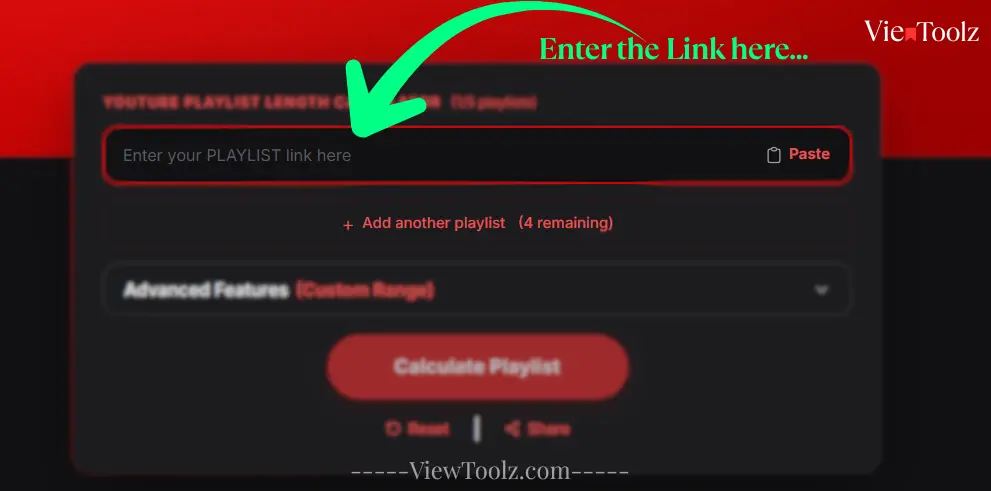
"粘贴播放列表 URL"
点击该按钮以启动分析。对于大型播放列表,ViewToolz 将显示实时进度,以便您看到处理了多少个视频。
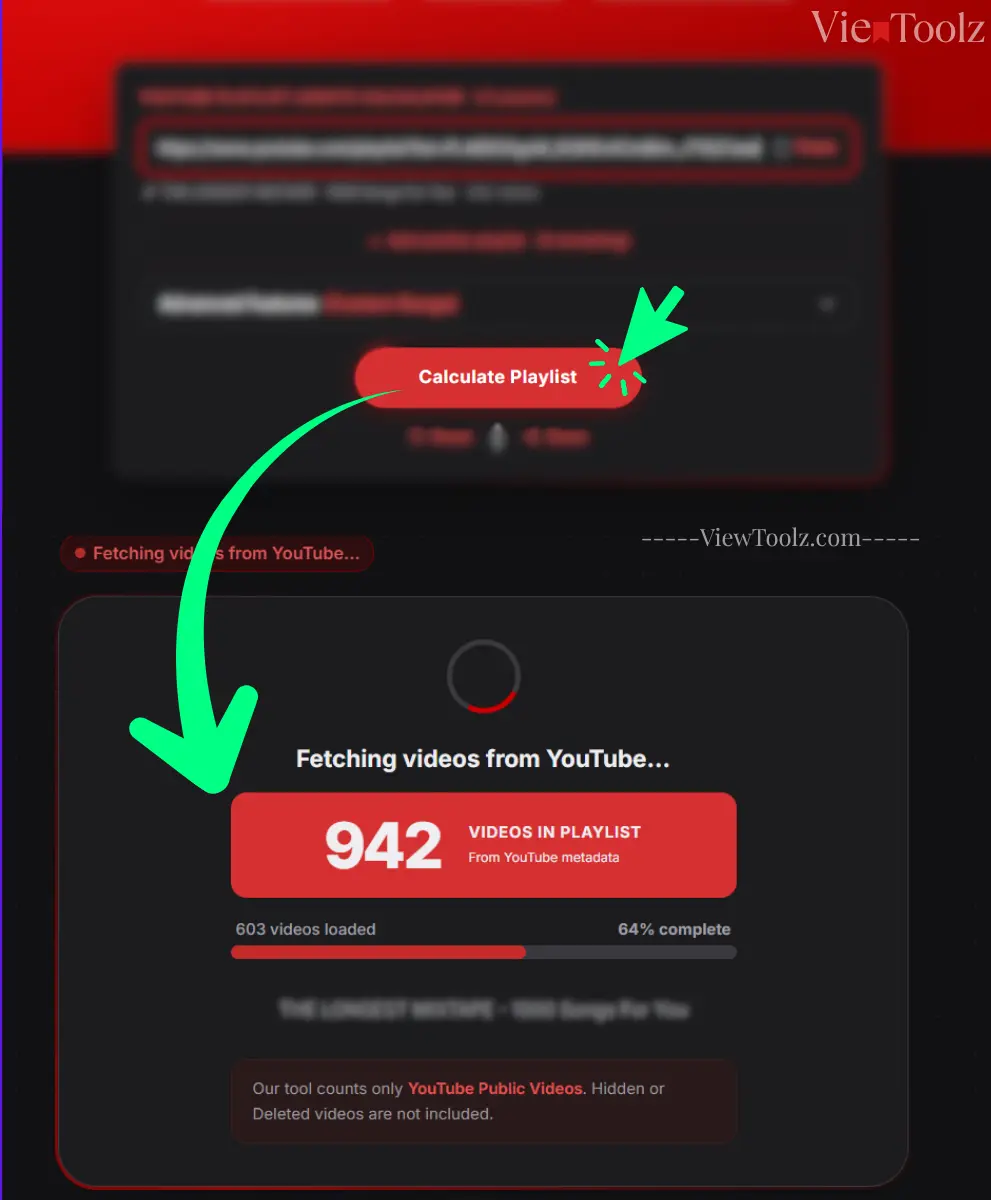
"加载进度画面"
计算完成后,您将看到播放列表时长、可用视频和无法播放视频、播放速度计算、互动指标、比较选项和导出工具。
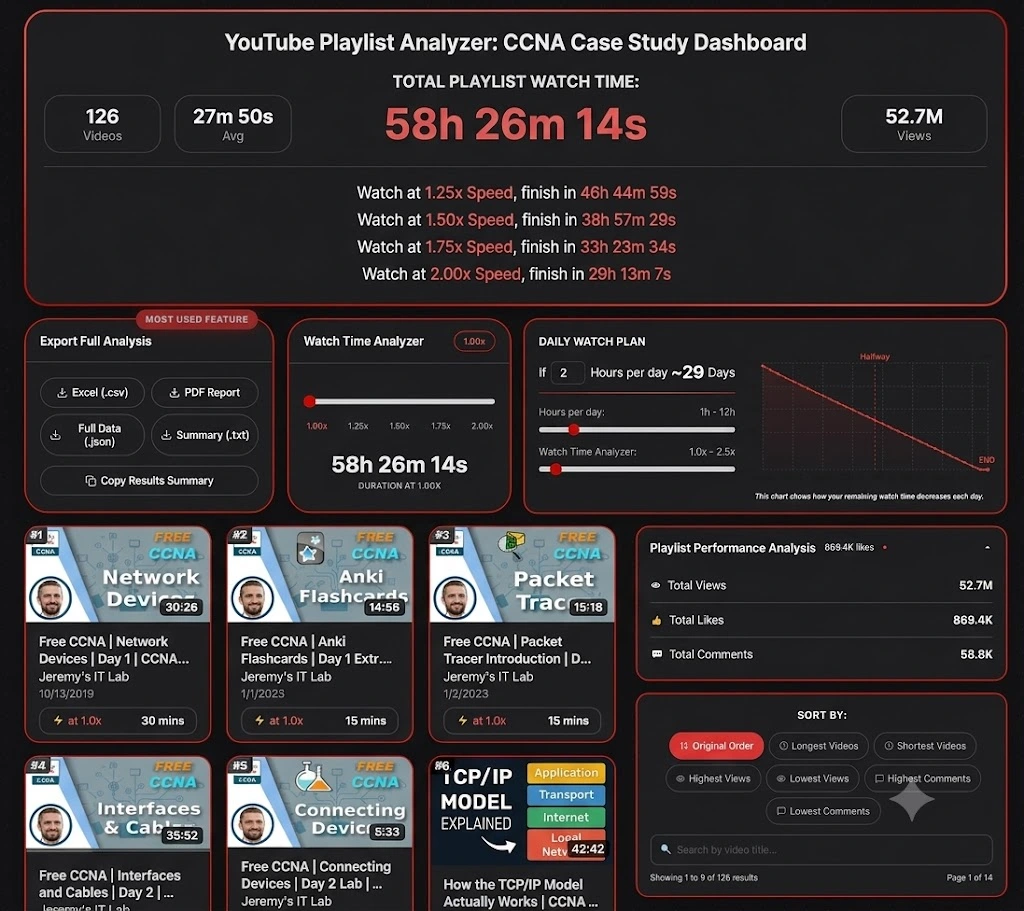
"结果信息中心"
如果您不确定先测试哪个播放列表?不妨探索一些在技术、教育、娱乐和音乐行业中最受欢迎的 YouTube 播放列表。这些示例将帮助您在分析自己的播放列表之前,直观了解 ViewToolz 是如何展示观看时间、播放速度估计、播放列表统计信息以及导出选项的。 (数据截至 2026 年 7 月 14 日)
热门技术播放列表是展示总时长、播放速度计算和播放列表分析等的极佳示例。

| 视频总数 | 41 |
| 总时长 | 3h 33m |
| 1.25倍速 观看时间 | 2h 50m 47s |
| 1.5倍速 观看时间 | 2h 22m 19s |
| 2倍速 观看时间 | 1h 46m 45s |
| 频道 | @StephaneMaarek |

| 视频总数 | 126 |
| 总时长 | 58小时26分钟 |
| 1.25倍速 观看时间 | 46小时44分钟59秒 |
| 1.5倍速 观看时间 | 38小时57分钟29秒 |
| 2倍速 观看时间 | 29小时13分钟7秒 |
| 频道 | @JeremysITLab |

| 视频总数 | 13 |
| 总时长 | 26小时22分钟 |
| 1.25倍速 观看时间 | 21小时5分钟51秒 |
| 1.5倍速 观看时间 | 17小时34分钟53秒 |
| 2倍速 观看时间 | 13小时11分钟10秒 |
| 频道 | @cs50 |

| 视频总数 | 74 |
| 总时长 | 35小时49分钟 |
| 1.25倍速 观看时间 | 28小时39分钟56秒 |
| 1.5倍速 观看时间 | 23小时53分钟17秒 |
| 2倍速 观看时间 | 17小时54分58秒 |
| 频道 | @mitocw |

| 视频总数 | 100 |
| 总时长 | 24小时28分钟 |
| 1.25倍速 观看时间 | 19小时34分钟45秒 |
| 1.5倍速 观看时间 | 16小时18分57秒 |
| 2倍速 观看时间 | 12小时14分钟13秒 |
| 频道 | @TEDx |

| 视频总数 | 199 |
| 总时长 | 45小时23分钟 |
| 1.25倍速 观看时间 | 36小时18分钟39秒 |
| 1.5倍速 观看时间 | 30小时15分钟33秒 |
| 2倍速 观看时间 | 22小时41分40秒 |
| 频道 | @ajdm168 |

| 视频总数 | 116 |
| 总时长 | 7小时1分钟 |
| 1.25倍速 观看时间 | 5小时37分钟3秒 |
| 1.5倍速 观看时间 | 4小时40分53秒 |
| 2倍速 观看时间 | 4小时40分53秒 |
| 频道 | @NoCopyrightSounds |

| 视频总数 | 69 |
| 总时长 | 5小时24分钟 |
| 1.25倍速 观看时间 | 4小时19分钟12秒 |
| 1.5倍速 观看时间 | 3小时36分0秒 |
| 2倍速 观看时间 | 2小时42分0秒 |
| 频道 | @Kassiapiano |
在两个或多个 YouTube 播放列表之间进行选择以开始您的课程确实很困难,尤其是当这两个课程或播放列表包含数十个或数百个视频时。ViewToolz 可帮助您免费并排比较最多五个公开 YouTube 播放列表,让您更轻松地确定哪一个适合您的可用时间并符合您的学习目标。
您无需每次都打开多个浏览器标签页并分别计算每个播放列表,只需在 ViewToolz 的单个比较视图中即可查看观看时间、视频数量、播放速度估计和其他统计信息。
| Metric | AWS Tutorials (数据截至 2026 年 7 月 14 日) | CS50x 2025 Lectures (数据截至 2026 年 7 月 14 日) | 100 must-watch TEDx talks (数据截至 2026 年 7 月 14 日) | MrBeast Video Playlist (数据截至 2026 年 7 月 14 日) | NCS: The Top 50 Biggest Songs (数据截至 2026 年 7 月 14 日) |
|---|---|---|---|---|---|
| 视频总数 | 41 (of 41) | 13 (of 13) | 100 (of 100) | 199 (of 204) | 116 (of 120) |
| 总时长 | 3h 33m 0s | 26h 22m 19s | 24h 28m 26s | 45h 23m 19s | 7h 1m 19s |
| 1.25倍速 观看时间 | 2h 50m 47s | 21h 5m 51s | 19h 34m 45s | 36h 18m 39s | 5h 37m 3s |
| 1.5倍速 观看时间 | 2h 22m 19s | 17h 34m 53s | 16h 18m 57s | 30h 15m 33s | 4h 40m 53s |
| 1.75倍速 观看时间 | 2h 1m 43s | 15h 4m 11s | 13h 59m 6s | 25h 56m 11s | 4h 0m 45s |
| 2倍速 观看时间 | [1h 46m 45s] | 13h 11m 10s | 12h 14m 13s | 22h 41m 40s | 3h 30m 40s |
| 不可用视频 | 0 | 0 | 0 | 5 | 4 |
| 平均视频长度 | 5m 12s | 2h 1m 43s | 14m 41s | 13m 41s | 3m 38s |
| 总观看次数 | 8.5M | 5.8M | 437.4M | 23.1B | 8.1B |
免费的播放列表比较功能对于希望在将宝贵的时间投入到课程或系列中之前做出明智决定的学生、在职专业人士、教育工作者和社交媒体内容创作者总是很有用。通过并排比较播放列表,他们可以更好地选择符合其日程安排的播放列表,而不仅仅是根据该播放列表中的视频数量进行选择。
ViewToolz 旨在分析各种规模的 YouTube 播放列表,从几个视频到 YouTube 支持的最大播放列表大小(截至 2026 年 7 月 12 日,每个播放列表限制为 5,000 个视频)。无论您是查看简短的教程系列还是海量的学习视频,此计算器都旨在处理整个完整的公开播放列表,并在单个详细报告中提供结果。
大型播放列表通常包含数百或数千个视频。启动计算后,我们的工具会显示实时进度,而不是让您想知道播放列表计算是否仍在运行,它会显示已处理了多少视频以及还剩多少视频。加载进度条会实时更新,显示到目前为止完成的视频百分比以及此时此刻正在处理的当前视频编号。这使用户更容易理解在分析播放列表时发生了什么。
目前,YouTube 仅允许每个播放列表最多包含 5,000 个视频,因此我们的工具目前正是围绕该限制构建的。这意味着您可以分析即使是最大的公开播放列表,而无需自己将它们拆分为较小的部分。如果 YouTube 增加(或更改)该限制,我们将更新我们的工具以支持它,而无需费吹灰之力。
之后,您将看到有关播放列表的所有统计信息。该播放列表有多少个视频、多少个可用和不可用视频、该播放列表的总时长、导出选项、每日观看计划、视频和统计信息的实时数据图表、不同的过滤选项(例如最长视频、评论最多视频、观看次数最少视频等),
| 能力 | ViewToolz |
|---|---|
| 最大播放列表大小 | 高达 5,000 个视频 |
| 处理反馈 | 实时进度 |
| 不可用视频 | 明确报告 |
| 结果 | 完整的播放列表摘要 |
| 数据源 | 官方 YouTube Data API v3 |
通过调整视频的播放速度,您可以大大缩短完成大型 YouTube 播放列表所需的总时间。ViewToolz 会自动计算不同播放速度下的总观看时间,帮助您根据自己喜欢的观看方式决定观看完整个播放列表需要多长时间。默认情况下,我们的工具会显示流行播放速度下的总观看时间,例如
| 播放速度 | 完成时间 |
|---|---|
| 1.25x Speed | 46h 44m 59s |
| 1.50x Speed | 38h 57m 29s |
| 1.75x Speed | 33h 23m 34s |
| 2.00x Speed | 29h 13m 7s |
无需用户手动计算差异, our tool 会立即显示每个支持的播放速度的更新完成时间。这使得在不离开结果页面的情况下规划学习课程、培训计划、锻炼或娱乐变得更加容易。
ViewToolz 支持所有标准的 YouTube 播放速度,并且还允许您使用内置的速度滑块来进行更灵活的估计,该滑块具有多种播放选项。
| 播放速度 | 目的 |
|---|---|
| 1× | 正常观看 |
| 1.25× | 舒适的学习速度 |
| 1.5× | 在在线课程中很受欢迎 |
| 1.75× | 快速复习课程 |
| 2× | 最大 YouTube 播放速度 |
| Custom Slider | 使用您喜欢的速度估计观看时间 |
分析播放列表后,您可能希望保存结果、与他人分享或继续使用数据。ViewToolz 允许您以五种不同的格式导出播放列表分析,从而轻松将该信息用于学习规划、报告、记录或个人参考。
每个导出选项都是针对不同的目的而设计的。无论您需要可打印的报告、用于分析的电子表格还是供开发人员使用的结构化文件,您都可以在不重新计算播放列表的情况下下载最适合您工作流程的格式。
| 格式 | 最适合 | 描述 |
|---|---|---|
| CSV (.csv) | Excel & Google 表格 | 将播放列表数据导入电子表格中以进行排序、过滤和分析。 |
| PDF 报告 | 打印与共享 | 生成一份专业的报告以便离线查看或共享。 |
| JSON (.json) | 开发人员 | 用于集成和自动化的结构化播放列表数据。 |
| 摘要 (.txt) | 快速参考 | 保存轻量级的文本摘要。 |
| 复制摘要 | 即时分享 | 将结果直接复制到剪贴板中。 |
Knowing the total playlist duration is only part of the picture. But, ViewToolz also provides useful playlist statistics and engagement metrics that help you understand the structure and popularity of a playlist before you start watching and learning. These insights make it easier to evaluate a playlist without opening every video individually.
| Metric | Why It Matters |
|---|---|
| Total Videos | See how many videos are included in the playlist. |
| Available Videos | Videos successfully analysed and included in the calculation. |
| Unavailable Videos | Private, deleted, or unavailable videos reported separately. |
| Total Duration | Combined watch time for all available videos. |
| Average Video Length | Understand the typical lesson or video length. |
| Total Views | See the combined popularity of the playlist where available. |
| Likes | Review engagement where publicly available. |
| Comments | Understand audience interaction where available. |
A long YouTube playlist can feel overwhelming until you break it into smaller daily goals. The Daily Watch Planner feature in ViewToolz helps you estimate how many days it will take you to finish a playlist based on the amount of time you can watch each day.
We also have the Live chart feature for you to see exactly how long it will take to finish your playlist. You can adjust your daily watch time and playback speed, and the chart updates instantly to show your remaining watch time and estimated completion date.
Choose the amount of time you can realistically dedicate each day. ViewToolz will calculate the number of days required to complete the whole playlist and update the schedule automatically as your viewing time changes.
If you find that the total number of videos in your results is shown less than what is displayed in the playlist on YouTube, Please don't worry; because the tool hasn't skipped any of the videos The real reason is there are some videos that cannot be analyzed because YouTube does not make their duration or metadata publicly accessible through the official YouTube Data API.
ViewToolz effectively separates all the available videos from those that are unavailable at that moment, ensuring you always know accurately how many videos were included in the calculation and the reasons for any exclusions. In this way, you can always understand the final watch time without having to wonder if the calculation is complete or not.
| Reason | Explanation |
|---|---|
| Private Videos | The uploader has made the video private, so YouTube no longer provides public access. |
| Deleted Videos | The original video has been removed from YouTube and can no longer be analysed. |
| Unavailable Videos | Some videos are restricted or unavailable in your region or account. |
| Removed Content | Videos removed because of copyright claims or policy violations are excluded. |
| API Limitations | If YouTube does not return duration information through the official API, the video cannot be included in the total watch time. |
Instead of silently ignoring all the unavailable videos in the end report like other tools, ViewToolz reports and highlights them separately in the results dashboard for you to clearly see it. This gives you a clearer understanding of the missing playlist videos and helps explain why the total watch time may differ from the number of videos displayed on YouTube.
ViewToolz retrieves publicly available playlist information using the official YouTube Data API v3. Using YouTube's official developer platform helps provide consistent and up-to-date playlist information without relying on unofficial scraping methods or outdated databases.
Every time you calculate a playlist, ViewToolz requests the latest publicly available data directly from YouTube. If a playlist changes because videos are added, removed, or made private, recalculating the playlist will reflect those public changes on the report dashboard.
| Benefit | What It Means |
|---|---|
| Official Data Source | Information comes from YouTube's official developer API. |
| Current Public Data | Results reflect the latest publicly available playlist information. |
| Reliable Calculations | Watch time is calculated from video durations returned by YouTube. |
| Transparent Reporting | Unavailable videos are reported instead of silently ignored. |
| Future Updates | Recalculate any time to refresh playlist information. |
These are some of the most common questions users have about calculating YouTube playlist duration with ViewToolz.
Yes. You can calculate public YouTube playlist duration without creating an account.
No. No login or registration is required.
ViewToolz supports public playlists with up to 5,000 videos, which is YouTube's maximum playlist size.
No. Only publicly accessible playlists can be analysed.
Private, deleted, or unavailable videos cannot be fully analysed because YouTube does not provide their data publicly.
ViewToolz uses the official YouTube Data API v3 to retrieve publicly available playlist information.
Yes. Compare up to five playlists side by side.
Yes. Export as CSV, PDF, JSON, TXT, Xlsx or copy a summary.
Yes. ViewToolz estimates watch time at multiple playback speeds.
Yes. The calculator works on mobile, desktop and all the operating system's browsers.
No, You need to recalculate the playlist anytime to fetch the latest public information.
No. ViewToolz analyzes your playlist in real time. There's no account required, and we don't save your playlist data after the analysis.
Unavailable videos may not be included because YouTube does not provide their duration publicly.
Yes, any supported public YouTube playlist can be analysed.
Yes. It's useful for AWS, CCNA, CS50, Python, and many other courses.
Yes, use the playback speed controls for flexible estimates.
Xlsx and CSV are Available
Yes.
Yes, export them as a PDF.
No, Public playlists can be analysed whenever needed.
Yes. We mention at the top of the report/
Yes, use the Daily Watch Planner.
It saves time and provides additional statistics in one report.
No.But we have options for that too.
All Modern desktop and mobile browsers.
Yes, any supported public YouTube Podcasts playlist can be analysed.
Yes.We do have
支持 1 到 5,000+ 个视频。立即获得完整分析。
YouTube 播放列表时长计算器(1/5 个播放列表)
要获取多个播放列表,请完成快速验证。
