
De meest nauwkeurige YouTube-afspeellijstlengtecalculator om de exacte kijktijd te bepalen voor afspeellijsten tot 5000 video's zonder limiet van 500 video's. Vergelijk meerdere afspeellijsten, exporteer naar CSV, PDF en JSON met betrokkenheidsstatistieken en visuele grafieken.
ViewToolz is een gratis tool gemaakt voor iedereen qui precies wil weten hoe lang het duurt om een YouTube-afspeellijst volledig te bekijken. Of je nu studeert voor online certificeringen, een gratis online YouTube-cursus volgt, naar muziek luistert of onderzoek doet naar inhoud, onze tool geeft je een complete afspeellijstanalyse op één plek waar je alle gegevens van deze afspeellijst gratis kunt inzien.
In plaats van alleen de totale duur van de afspeellijsten te tonen, laat ViewToolz je de volledige gegevens van de afspeellijst zien en helpt je deze te begrijpen. Onze tool ondersteunt YouTube-afspeellijsten met maximaal 5.000 video's en vergelijkt gratis meerdere afspeellijsten naast elkaar, berekent de kijktijd bij verschillende afspeelsnelheden, identificeert de niet-beschikbare video's en stelt je in staat om resultaten gratis te exporteren in five verschillende formaten.
ViewToolz maakt gebruik van alle openbaar beschikbare afspeellijstinformatie die is opgehaald via de officiële YouTube Data API v3. Het gebruik van deze methode helpt onze tool ervoor te zorgen dat de resultaten up-to-date zijn met de nieuwste informatie van YouTube.
| Kenmerk | Details |
|---|---|
| Maximale afspeellijstgrootte | 5.000 video's |
| Afspeellijst vergelijking | Tot 5 afspeellijsten |
| Exportformaten | CSV, PDF, JSON, TXT, Samenvatting kopiëren |
| Inloggen | Geen login vereist |
| Gegevensbron | Officiële YouTube Data API v3 |
| Afspeelsnelheid | Ondersteund |
| Ontbrekende video's | Ja, ontbrekende video's getoond |
| Dagelijks kijkplan | Kijktijd-analysator met aangepaste grafieken |
| Afspeellijst prestatieanalyse | Totaal weergaven, Likes, Reacties |
| Sorteeropties | Inclusief 7 gratis sorteeropties |
| Ondersteunde afspeellijsttypen | Alle soorten, inclusief muziek, normale video's en, belangrijker nog, ook YouTube-podcasts. |
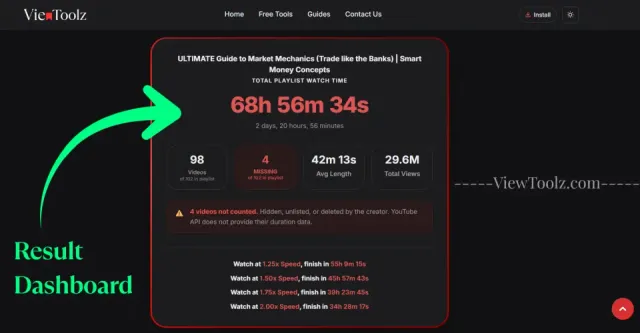
"Voeg hier een screenshot in van het volledige resultatendashboard"
ViewToolz is zo gemaakt dat alle processen eenvoudig blijven. Je hoeft geen account aan te maken, geen software te installeren of handmatig de duur van elke video afzonderlijk toe te voegen. Plak gewoon de URL van een openbare YouTube-afspeellijst en laat de rekenmachine het werk doen.
De rekenmachine haalt openbaar beschikbare afspeellijstinformatie op. Zodra de analyse is voltooid, ontvang je een gedetailleerd rapport met de totale kijktijd, schattingen van de afspeelsnelheid, afspeellijststatistieken, niet-beschikbare video's, exportopties en nog veel meer.
Open de YouTube-afspeellijst die je wilt analyseren en kopieer de URL uit je browser.

"Afspeellijst-URL kopiëren"
Plak de gekopieerde URL in het ViewToolz-invoerveld op de calculatorpagina.
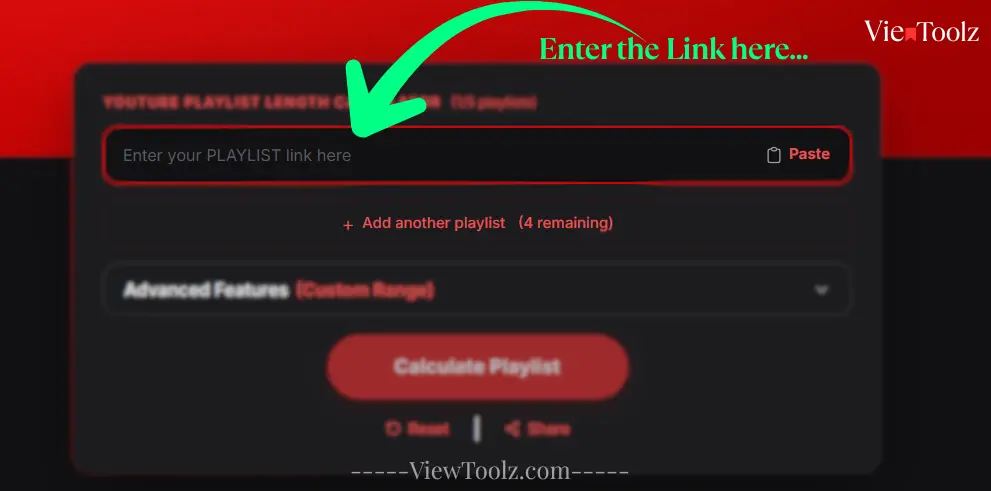
"Afspeellijst-URL plakken"
Klik op de knop om de analyse te starten. Voor grote afspeellijsten toont ViewToolz de live voortgang, zodat je kunt zien hoeveel video's er zijn verwerkt.
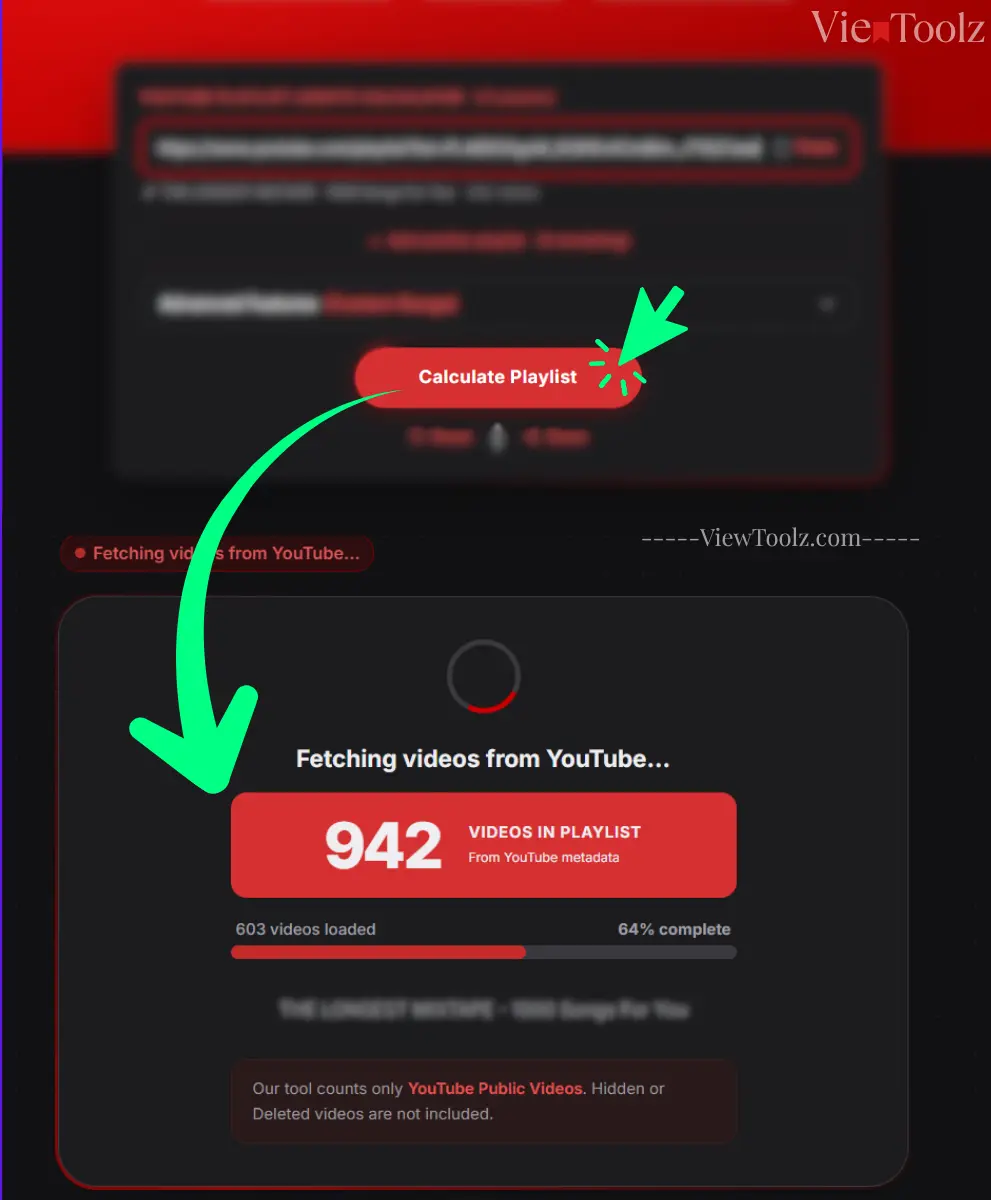
"Laadvoortgangsscherm"
Nadat de berekening is voltooid, zie je de afspeellijstduur, beschikbare en niet-beschikbare video's, berekeningen van de afspeelsnelheid, betrokkenheidsstatistieken, vergelijkingsopties en exporttools.
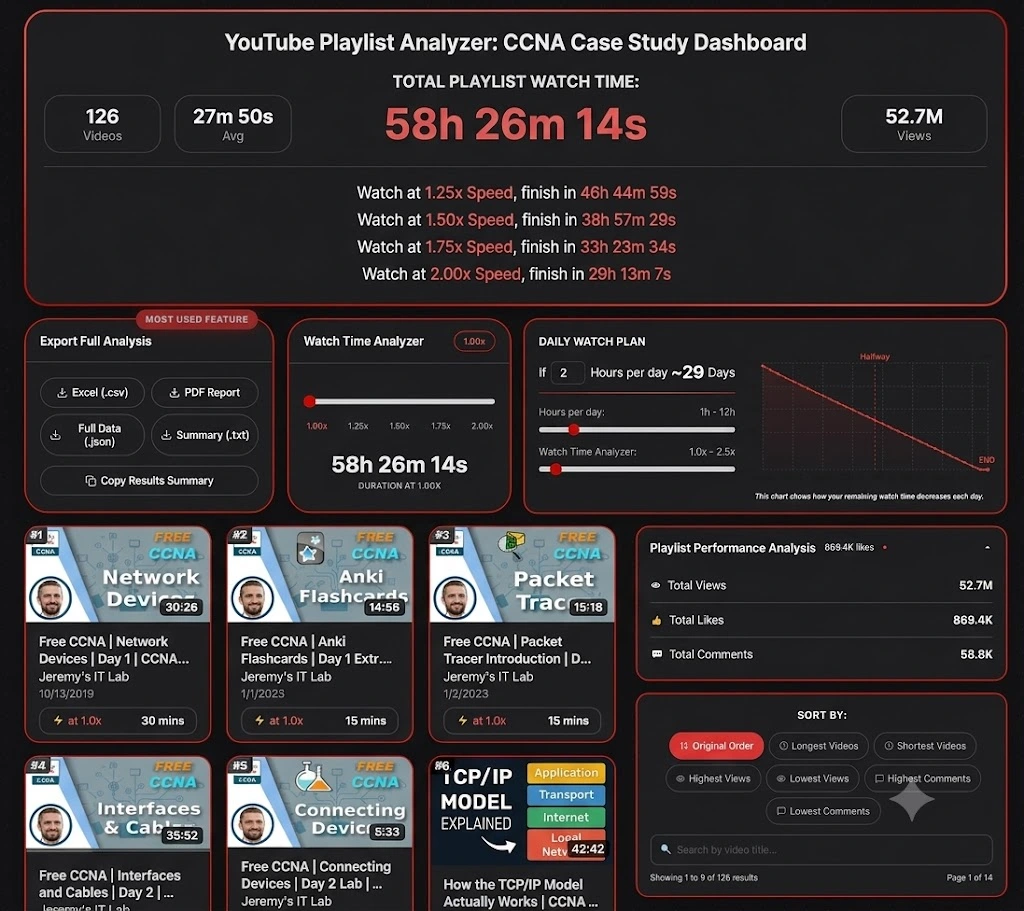
"Resultatendashboard"
Weet je niet zeker welke afspeellijst je als eerste moet testen? Ontdek enkele van de populairste YouTube-afspeellijsten in de technologie, het onderwijs, entertainment en de muziekindustrie. Met deze voorbeelden kun je zien hoe ViewToolz de kijktijd, schattingen van de afspeelsnelheid, afspeellijststatistieken en exportopties presenteert voordat je je eigen afspeellijst analyseert. (Gegevens per 14 juli 2026)
Populaire technologie-afspeellijsten zijn uitstekende voorbeelden voor het demonstreren van de totale duur, berekeningen van de afspeelsnelheid, afspeellijststatistieken, enz.

| Totaal aantal video's | 41 |
| Totale duur | 3h 33m |
| 1.25× Kijktijd | 2h 50m 47s |
| 1.5× Kijktijd | 2h 22m 19s |
| 2× Kijktijd | 1h 46m 45s |
| Kanaal | @StephaneMaarek |

| Totaal aantal video's | 126 |
| Totale duur | 58u 26m |
| 1.25× Kijktijd | 46u 44m 59s |
| 1.5× Kijktijd | 38u 57m 29s |
| 2× Kijktijd | 29u 13m 7s |
| Kanaal | @JeremysITLab |

| Totaal aantal video's | 13 |
| Totale duur | 26u 22m |
| 1.25× Kijktijd | 21u 5m 51s |
| 1.5× Kijktijd | 17u 34m 53s |
| 2× Kijktijd | 13u 11m 10s |
| Kanaal | @cs50 |

| Totaal aantal video's | 74 |
| Totale duur | 35u 49m |
| 1.25× Kijktijd | 28u 39m 56s |
| 1.5× Kijktijd | 23u 53m 17s |
| 2× Kijktijd | 17u 54m 58s |
| Kanaal | @mitocw |

| Totaal aantal video's | 100 |
| Totale duur | 24u 28m |
| 1.25× Kijktijd | 19u 34m 45s |
| 1.5× Kijktijd | 16u 18m 57s |
| 2× Kijktijd | 12u 14m 13s |
| Kanaal | @TEDx |

| Totaal aantal video's | 199 |
| Totale duur | 45u 23m |
| 1.25× Kijktijd | 36u 18m 39s |
| 1.5× Kijktijd | 30u 15m 33s |
| 2× Kijktijd | 22u 41m 40s |
| Kanaal | @ajdm168 |
| Totaal aantal video's | 116 |
| Totale duur | 7u 1m |
| 1.25× Kijktijd | 5u 37m 3s |
| 1.5× Kijktijd | 4u 40m 53s |
| 2× Kijktijd | 4u 40m 53s |
| Kanaal | @NoCopyrightSounds |

| Totaal aantal video's | 69 |
| Totale duur | 5u 24m |
| 1.25× Kijktijd | 4u 19m 12s |
| 1.5× Kijktijd | 3u 36m 0s |
| 2× Kijktijd | 2u 42m 0s |
| Kanaal | @Kassiapiano |
Kiezen tussen twee of meer YouTube-afspeellijsten om aan je cursus te beginnen is erg lastig, vooral wanneer beide cursussen of afspeellijsten tientallen of honderden video's bevatten. ViewToolz helpt je om gratis tot vijf openbare YouTube-afspeellijsten naast elkaar te vergelijken, waardoor het makkelijker wordt om te beslissen welke afspeellijst het best bij je beschikbare tijd past en aansluit bij je leerdoelen.
In plaats van dat je telkens meerdere browsertabs moet openen en elke afspeellijst afzonderlijk moet berekenen, kun je de kijktijd, het aantal video's, schattingen van de afspeelsnelheid en andere statistieken in één vergelijkingsoverzicht bekijken, alleen in ViewToolz.
| Metric | AWS Tutorials (Gegevens per 14 juli 2026) | CS50x 2025 Lectures (Gegevens per 14 juli 2026) | 100 must-watch TEDx talks (Gegevens per 14 juli 2026) | MrBeast Video Playlist (Gegevens per 14 juli 2026) | NCS: The Top 50 Biggest Songs (Gegevens per 14 juli 2026) |
|---|---|---|---|---|---|
| Totaal aantal video's | 41 (of 41) | 13 (of 13) | 100 (of 100) | 199 (of 204) | 116 (of 120) |
| Totale duur | 3h 33m 0s | 26h 22m 19s | 24h 28m 26s | 45h 23m 19s | 7h 1m 19s |
| 1.25× Kijktijd | 2h 50m 47s | 21h 5m 51s | 19h 34m 45s | 36h 18m 39s | 5h 37m 3s |
| 1.5× Kijktijd | 2h 22m 19s | 17h 34m 53s | 16h 18m 57s | 30h 15m 33s | 4h 40m 53s |
| 1.75× Kijktijd | 2h 1m 43s | 15h 4m 11s | 13h 59m 6s | 25h 56m 11s | 4h 0m 45s |
| 2× Kijktijd | [1h 46m 45s] | 13h 11m 10s | 12h 14m 13s | 22h 41m 40s | 3h 30m 40s |
| Niet-beschikbare video's | 0 | 0 | 0 | 5 | 4 |
| Gemiddelde videolengte | 5m 12s | 2h 1m 43s | 14m 41s | 13m 41s | 3m 38s |
| Totaal aantal weergaven | 8.5M | 5.8M | 437.4M | 23.1B | 8.1B |
De gratis vergelijkingsfunctie voor afspeellijsten is altijd handig voor studenten, werkende professionals, docenten en makers van socialmediacontent die weloverwogen beslissingen willen nemen voordat ze hun kostbare tijd en uren in een cursus of serie steken. Door afspeellijsten naast elkaar te vergelijken, kunnen ze de lijst kiezen die het best bij hun schema past, en niet alleen afgaan op het aantal video's in die afspeellijst.
ViewToolz is ontworpen om YouTube-afspeellijsten te analyseren, variërend van een paar video's tot de maximale afspeellijstgrootte die door YouTube wordt ondersteund, wat de limiet van 5000 video's per afspeellijst is vanaf 12 juli 2026. Of je nu kijkt naar een korte tutorialserie of een enorme leervideo, deze calculator is ontworpen om de hele openbare afspeellijst te verwerken en de resultaten in één gedetailleerd rapport te presenteren.
Grote afspeellijsten bevatten altijd honderden of duizenden video's. Nadat je de berekening hebt gestart, laat onze tool de voortgang in realtime zien, in plaats van dat je je moet afvragen of de berekening nog wel loopt. Je ziet hoeveel video's er zijn verwerkt en hoeveel er nog over zijn. De voortgangsbalk voor het laden wordt in realtime bijgewerkt en toont het percentage video's dat tot nu toe is voltooid en het huidige videonummer dat op dat moment wordt verwerkt. Dit maakt het voor gebruikers gemakkelijker om te begrijpen wat er gebeurt terwijl de afspeellijst wordt geanalyseerd.
Op dit moment staat YouTube slechts tot 5.000 video's per afspeellijst toe, dus dat is de limiet waar onze tool momenteel omheen is gebouwd. Dit betekent dat je zelfs de grootste openbare afspeellijsten kunt analyseren zonder ze zelf in kleinere stukken te hoeven splitsen. Als YouTube die limiet ooit verhoogt (of wijzigt), zullen we onze tool bijwerken om dat ook te ondersteunen zonder er moeite voor te hoeven doen.
Daarna zie je alle statistieken over de afspeellijsten: hoeveel video's die afspeellijst heeft, hoeveel beschikbare en niet-beschikbare video's, de totale duur van die afspeellijst, exportopties, dagelijkse watch plans, een live datagrafiek van de video's en statistieken, verschillende filteropties zoals langste video's, video's met de meeste reacties, minst bekeken video's enz.
| Functionaliteit | ViewToolz |
|---|---|
| Maximale afspeellijstgrootte | Tot 5.000 video's |
| Verwerkingsfeedback | Realtime voortgang |
| Niet-beschikbare video's | Duidelijk gerapporteerd |
| Resultaten | Volledige samenvatting van afspeellijst |
| Gegevensbron | Officiële YouTube Data API v3 |
Door de afspeelsnelheid van de video's aan te passen, kun je de totale tijd die nodig is om een grote YouTube-afspeellijst te voltooien grotendeels verkorten. ViewToolz berekent automatisch de totale kijktijd bij verschillende afspeelsnelheden, zodat je kunt bepalen hoe lang je over de hele afspeellijst doet op basis van je favoriete kijkgewoonten. Standaard toont onze tool de totale kijktijd op populaire afspeelsnelheden, zoals
| Afspeelsnelheid | Eindtijd |
|---|---|
| 1.25x Speed | 46h 44m 59s |
| 1.50x Speed | 38h 57m 29s |
| 1.75x Speed | 33h 23m 34s |
| 2.00x Speed | 29h 13m 7s |
In plaats van dat gebruikers het verschil handmatig moeten berekenen, toont onze tool direct alle bijgewerkte voltooiingstijden voor elke ondersteunde afspeelsnelheid. Dit maakt het gemakkelijker om studiesessies, trainingsschema's, workouts of entertainment te plannen zonder de resultatenpagina te verlaten.
ViewToolz ondersteunt alle standaard YouTube-afspeelsnelheden en stelt je bovendien in staat om de ingebouwde snelheidsregelaar te gebruiken voor flexibelere schattingen, die meerdere afspeelopties heeft.
| Afspeelsnelheid | Doel |
|---|---|
| 1× | Normale weergave |
| 1.25× | Comfortabele leersnelheid |
| 1.5× | Populair voor online cursussen |
| 1.75× | Snelle herhalingssessies |
| 2× | Maximale afspeelsnelheid van YouTube |
| Custom Slider | Schat de kijktijd met je voorkeurssnelheid |
Na het analyseren van een afspeellijst wil je misschien de resultaten opslaan, delen met anderen of verder werken met de gegevens. ViewToolz stelt je in staat om je afspeellijstanalyse in vijf verschillende formaten te exporteren, waardoor het gemakkelijk is om de informatie te gebruiken voor studieplanning, rapportage, documentatie of persoonlijke referentie.
Elke exportoptie is ontworpen voor een ander doel. Of je nu een afdrukbaar rapport, een spreadsheet voor analyse of een gestructureerd bestand voor ontwikkelaars nodig hebt, je kunt het formaat downloaden dat het beste bij je workflow past zonder de afspeellijst opnieuw te berekenen.
| Formaat | Beste voor | Beschrijving |
|---|---|---|
| CSV (.csv) | Excel & Google Sheets | Importeer afspeellijstgegevens in spreadsheets voor sorteren, filteren en analyse. |
| PDF-rapport | Afdrukken & Delen | Genereer een professioneel rapport voor offline weergave of delen. |
| JSON (.json) | Ontwikkelaars | Gestructureerde afspeellijstgegevens voor integraties en automatisering. |
| Samenvatting (.txt) | Snelle referentie | Sla een lichtgewicht tekstsamenvatting op. |
| Kopieer samenvatting | Direct delen | Kopieer resultaten rechtstreeks naar je klembord. |
Knowing the total playlist duration is only part of the picture. But, ViewToolz also provides useful playlist statistics and engagement metrics that help you understand the structure and popularity of a playlist before you start watching and learning. These insights make it easier to evaluate a playlist without opening every video individually.
| Metric | Why It Matters |
|---|---|
| Total Videos | See how many videos are included in the playlist. |
| Available Videos | Videos successfully analysed and included in the calculation. |
| Unavailable Videos | Private, deleted, or unavailable videos reported separately. |
| Total Duration | Combined watch time for all available videos. |
| Average Video Length | Understand the typical lesson or video length. |
| Total Views | See the combined popularity of the playlist where available. |
| Likes | Review engagement where publicly available. |
| Comments | Understand audience interaction where available. |
A long YouTube playlist can feel overwhelming until you break it into smaller daily goals. The Daily Watch Planner feature in ViewToolz helps you estimate how many days it will take you to finish a playlist based on the amount of time you can watch each day.
We also have the Live chart feature for you to see exactly how long it will take to finish your playlist. You can adjust your daily watch time and playback speed, and the chart updates instantly to show your remaining watch time and estimated completion date.
Choose the amount of time you can realistically dedicate each day. ViewToolz will calculate the number of days required to complete the whole playlist and update the schedule automatically as your viewing time changes.
If you find that the total number of videos in your results is shown less than what is displayed in the playlist on YouTube, Please don't worry; because the tool hasn't skipped any of the videos The real reason is there are some videos that cannot be analyzed because YouTube does not make their duration or metadata publicly accessible through the official YouTube Data API.
ViewToolz effectively separates all the available videos from those that are unavailable at that moment, ensuring you always know accurately how many videos were included in the calculation and the reasons for any exclusions. In this way, you can always understand the final watch time without having to wonder if the calculation is complete or not.
| Reason | Explanation |
|---|---|
| Private Videos | The uploader has made the video private, so YouTube no longer provides public access. |
| Deleted Videos | The original video has been removed from YouTube and can no longer be analysed. |
| Unavailable Videos | Some videos are restricted or unavailable in your region or account. |
| Removed Content | Videos removed because of copyright claims or policy violations are excluded. |
| API Limitations | If YouTube does not return duration information through the official API, the video cannot be included in the total watch time. |
Instead of silently ignoring all the unavailable videos in the end report like other tools, ViewToolz reports and highlights them separately in the results dashboard for you to clearly see it. This gives you a clearer understanding of the missing playlist videos and helps explain why the total watch time may differ from the number of videos displayed on YouTube.
ViewToolz retrieves publicly available playlist information using the official YouTube Data API v3. Using YouTube's official developer platform helps provide consistent and up-to-date playlist information without relying on unofficial scraping methods or outdated databases.
Every time you calculate a playlist, ViewToolz requests the latest publicly available data directly from YouTube. If a playlist changes because videos are added, removed, or made private, recalculating the playlist will reflect those public changes on the report dashboard.
| Benefit | What It Means |
|---|---|
| Official Data Source | Information comes from YouTube's official developer API. |
| Current Public Data | Results reflect the latest publicly available playlist information. |
| Reliable Calculations | Watch time is calculated from video durations returned by YouTube. |
| Transparent Reporting | Unavailable videos are reported instead of silently ignored. |
| Future Updates | Recalculate any time to refresh playlist information. |
These are some of the most common questions users have about calculating YouTube playlist duration with ViewToolz.
Yes. You can calculate public YouTube playlist duration without creating an account.
No. No login or registration is required.
ViewToolz supports public playlists with up to 5,000 videos, which is YouTube's maximum playlist size.
No. Only publicly accessible playlists can be analysed.
Private, deleted, or unavailable videos cannot be fully analysed because YouTube does not provide their data publicly.
ViewToolz uses the official YouTube Data API v3 to retrieve publicly available playlist information.
Yes. Compare up to five playlists side by side.
Yes. Export as CSV, PDF, JSON, TXT, Xlsx or copy a summary.
Yes. ViewToolz estimates watch time at multiple playback speeds.
Yes. The calculator works on mobile, desktop and all the operating system's browsers.
No, You need to recalculate the playlist anytime to fetch the latest public information.
No. ViewToolz analyzes your playlist in real time. There's no account required, and we don't save your playlist data after the analysis.
Unavailable videos may not be included because YouTube does not provide their duration publicly.
Yes, any supported public YouTube playlist can be analysed.
Yes. It's useful for AWS, CCNA, CS50, Python, and many other courses.
Yes, use the playback speed controls for flexible estimates.
Xlsx and CSV are Available
Yes.
Yes, export them as a PDF.
No, Public playlists can be analysed whenever needed.
Yes. We mention at the top of the report/
Yes, use the Daily Watch Planner.
It saves time and provides additional statistics in one report.
No.But we have options for that too.
All Modern desktop and mobile browsers.
Yes, any supported public YouTube Podcasts playlist can be analysed.
Yes.We do have
Van 1 tot 5.000+ video's. Direct volledige analyse.
YouTube Playlist Duur Calculator(1/5 playlists)
Voer een korte verificatie uit om meerdere afspeellijsten op te halen.
