
500개 동영상 제한 없이 최대 5,000개 동영상의 재생목록에 대한 정확한 시청 시간을 얻을 수 있는 가장 정확한 YouTube 재생목록 길이 계산기입니다. 여러 재생목록을 비교하고, 참여 지표와 시각적 그래프를 사용하여 CSV, PDF, JSON으로 내보냅니다.
ViewToolz는 YouTube 재생목록을 완전히 시청하는 데 시간이 얼마나 걸리는지 정확히 알고 싶어하는 모든 사람들을 위해 만들어진 무료 도구입니다. 온라인 자격증 공부, 무료 온라인 YouTube 강의 수강, 음악 감상, 또는 콘텐츠 리서치 등 어떤 목적이든 저희 도구는 한 곳에서 재생목록의 모든 데이터를 무료로 볼 수 있는 종합 분석 서비스를 제공합니다.
재생목록의 총 시간만 보여주는 대신, ViewToolz는 재생목록 전체의 데이터를 파악할 수 있도록 돕습니다. 저희 도구는 최대 5,000개의 동영상이 포함된 YouTube 재생목록을 지원하며, 여러 재생목록을 무료로 나란히 비교하고, 다양한 배속에서의 시청 시간을 계산하고, 사용할 수 없는 동영상을 식별하며, 결과를 5가지 다양한 형식으로 전액 무료로 내보낼 수 있게 합니다.
ViewToolz는 공식 YouTube Data API v3를 사용하여 가져온 공개적으로 사용 가능한 모든 재생목록 정보를 사용합니다. 이 방법을 사용함으로써 저희 도구는 결과가 YouTube의 최신 정보와 일치하도록 보장합니다.
| 기능 | 상세 정보 |
|---|---|
| 최대 재생목록 크기 | 5,000개 동영상 |
| 재생목록 비교 | 최대 5개 재생목록 |
| 내보내기 형식 | CSV, PDF, JSON, TXT, 요약 복사 |
| 로그인 | 로그인 불필요 |
| 데이터 소스 | 공식 YouTube Data API v3 |
| 재생 속도 배속 | 지원됨 |
| 누락된 동영상 | 예, 누락된 동영상 표시됨 |
| 일일 시청 계획 | 사용자 지정 그래프가 포함된 시청 시간 분석기 |
| 재생목록 성능 분석 | 총 조회수, 좋아요수, 댓글수 |
| 정렬 옵션 | 7가지 무료 정렬 옵션 포함 |
| 지원되는 재생목록 유형 | 음악, 일반 동영상 그리고 무엇보다 YouTube 팟캐스트까지 모두 포함하는 모든 유형. |
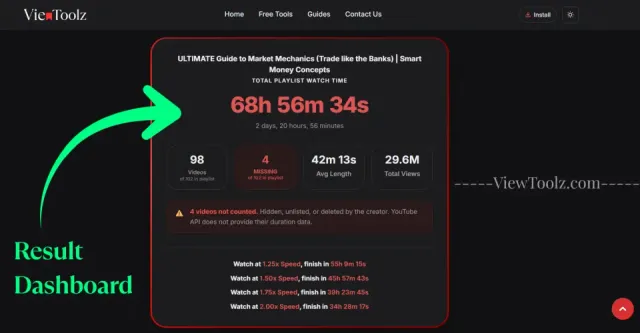
"여기에 전체 결과 대시보드의 스크린샷을 삽입하세요"
ViewToolz는 모든 과정을 간단하게 유지할 수 있도록 만들어졌습니다. 계정을 생성하거나, 소프트웨어를 설치하거나, 모든 동영상의 길이를 개별적으로 수동 시정할 필요가 없습니다. 공개 YouTube 재생목록 URL을 복사하여 입력란에 붙여넣기만 하면 계산기가 작동합니다.
계산기는 공개적으로 시청 가능한 재생목록 정보를 검색합니다. 분석이 완료되면 총 시청 시간, 재생 배속별 예상 시간, 재생목록 통계, 사용할 수 없는 동영상 목록, 내보내기 옵션 등의 상세 정보 보고서를 제공받게 됩니다.
분석하고자 하는 YouTube 재생목록을 열고 브라우저 주소창에서 URL을 복사합니다.

"재생목록 URL 복사"
복사한 URL을 계산기 페이지의 ViewToolz 입력란에 붙여넣습니다.
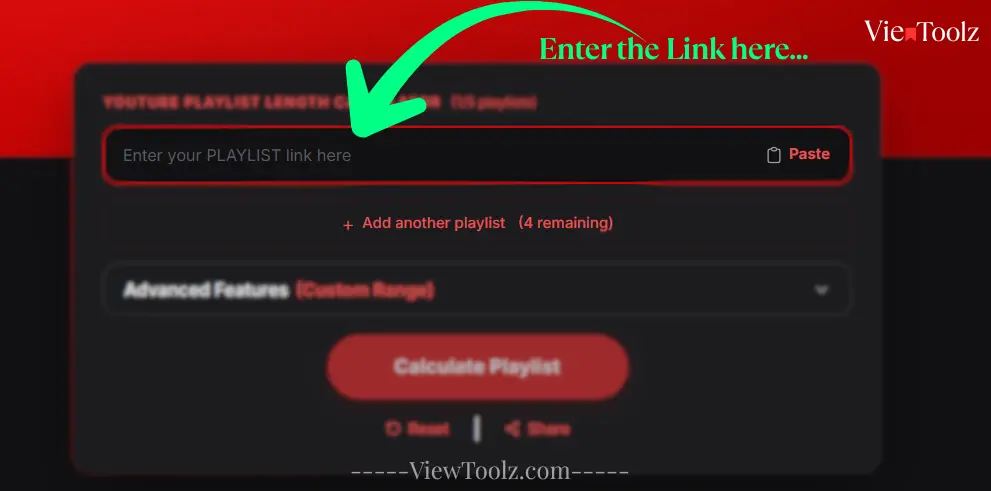
"재생목록 URL 붙여넣기"
분석을 시작하려면 버튼을 클릭합니다. 대규모 재생목록의 경우 ViewToolz가 로딩 상태를 실시간 표시하여 몇 개의 비디오가 처리되었는지 볼 수 있습니다.
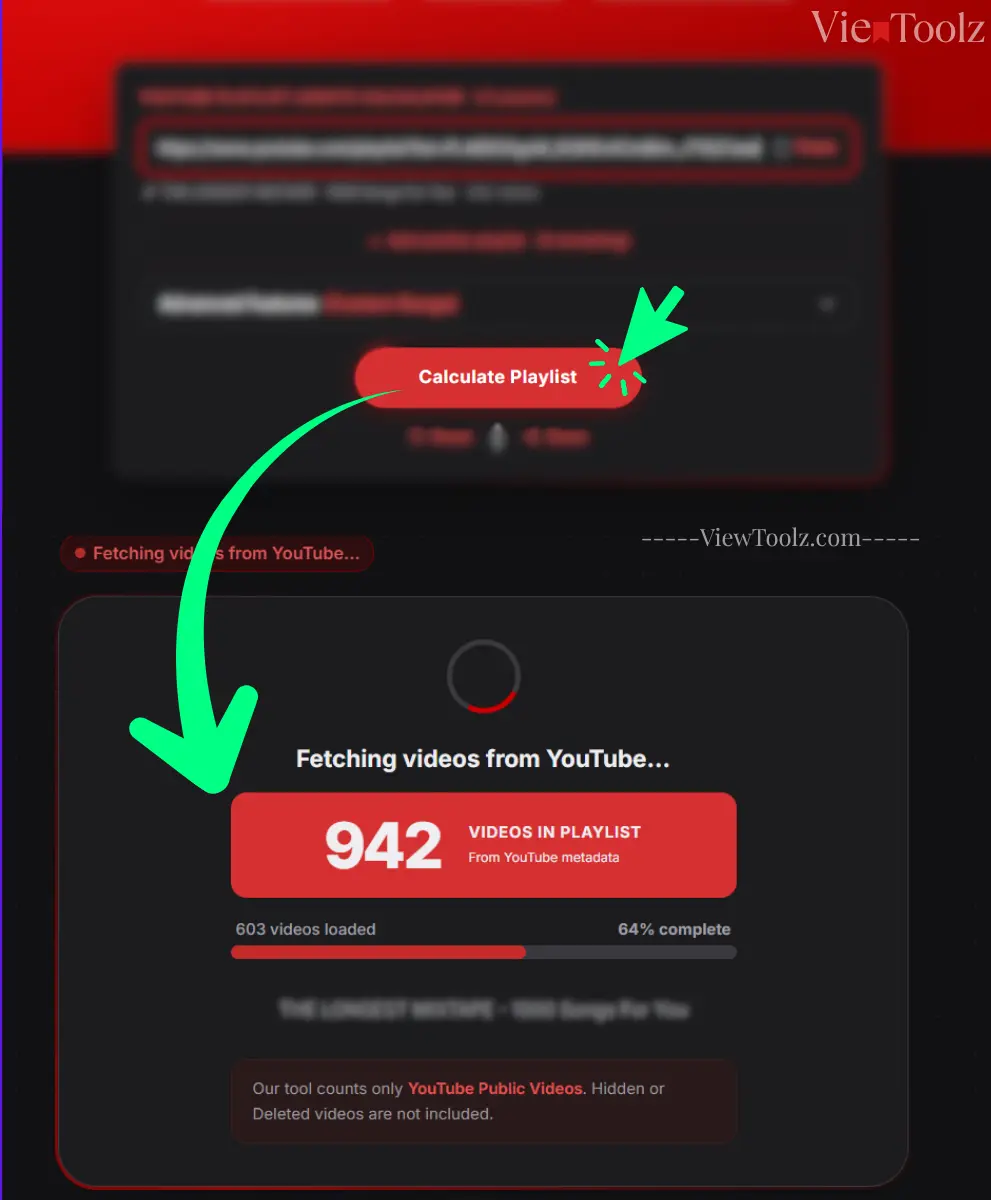
"로딩 진행 상황 화면"
계산이 완료되면 재생목록 재생 시간, 사용 가능한 비디오와 사용할 수 없는 비디오, 재생 배속 계산, 참여 지표, 비교 옵션 및 데이터 내보내기 도구가 나타납니다.
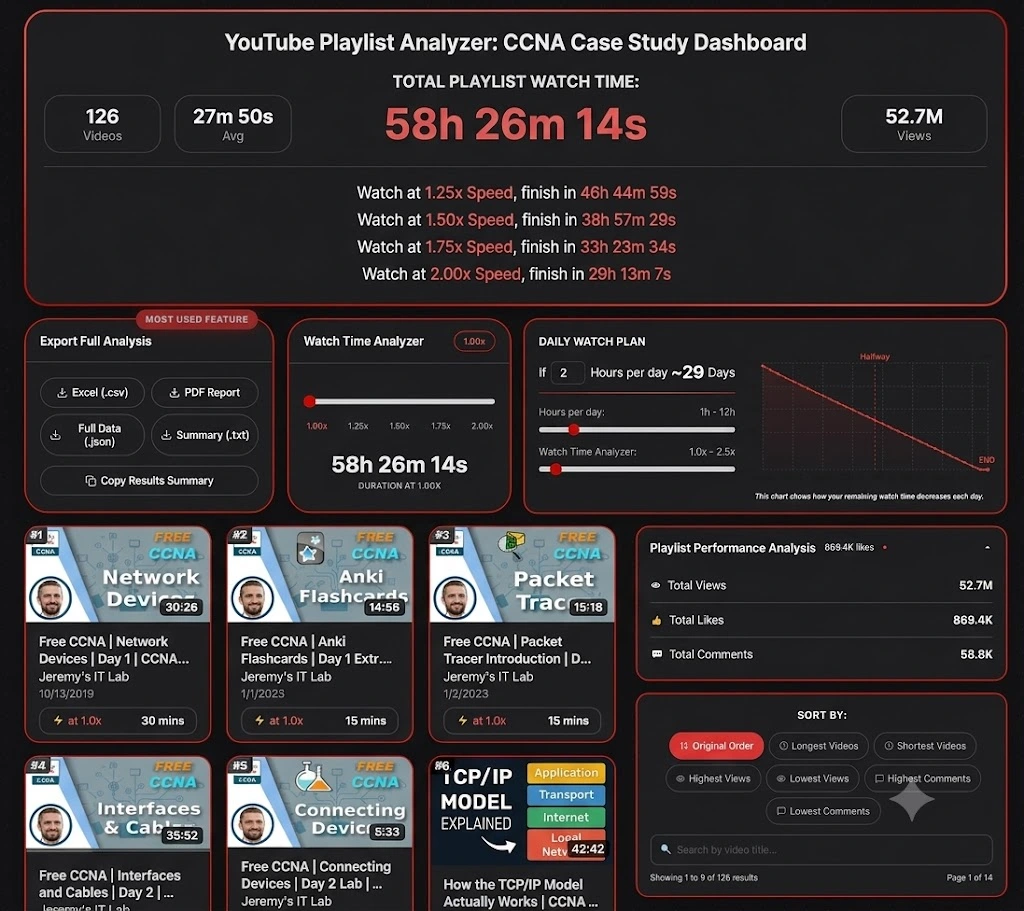
"결과 대시보드"
어떤 재생목록을 가장 먼저 테스트해야 할지 잘 모르시겠나요? 기술, 교육, 엔터테인먼트, 음악계 전반에 걸친 가장 인기 있는 YouTube 재생목록을 살펴보세요. 이러한 예시들을 이용하면 자신의 재생목록을 분석하기 전, ViewToolz가 총 시청 시간, 속도별 분석 시간, 재생목록 통계 및 내보내기 옵션을 어떻게 보여주는지 확인할 수 있습니다. (2026년 7월 14일 기준 데이터)
인기 기술 재생목록은 총 시간 길이, 배속 시청 시간 계산 및 재생목록 통계 분석 등을 테스트하기에 훌륭한 예시입니다.

| 총 동영상 수 | 41 |
| 총 재생 시간 | 3h 33m |
| 1.25배속 시청 시간 | 2h 50m 47s |
| 1.5배속 시청 시간 | 2h 22m 19s |
| 2배속 시청 시간 | 1h 46m 45s |
| 채널 | @StephaneMaarek |

| 총 동영상 수 | 126 |
| 총 재생 시간 | 58시간 26분 |
| 1.25배속 시청 시간 | 46시간 44분 59초 |
| 1.5배속 시청 시간 | 38시간 57분 29초 |
| 2배속 시청 시간 | 29시간 13분 7초 |
| 채널 | @JeremysITLab |

| 총 동영상 수 | 13 |
| 총 재생 시간 | 26시간 22분 |
| 1.25배속 시청 시간 | 21시간 5분 51초 |
| 1.5배속 시청 시간 | 17시간 34분 53초 |
| 2배속 시청 시간 | 13시간 11분 10초 |
| 채널 | @cs50 |

| 총 동영상 수 | 74 |
| 총 재생 시간 | 35시간 49분 |
| 1.25배속 시청 시간 | 28시간 39분 56초 |
| 1.5배속 시청 시간 | 23시간 53분 17초 |
| 2배속 시청 시간 | 17시간 54분 58초 |
| 채널 | @mitocw |

| 총 동영상 수 | 100 |
| 총 재생 시간 | 24시간 28분 |
| 1.25배속 시청 시간 | 19시간 34분 45초 |
| 1.5배속 시청 시간 | 16시간 18분 57초 |
| 2배속 시청 시간 | 12시간 14분 13초 |
| 채널 | @TEDx |

| 총 동영상 수 | 199 |
| 총 재생 시간 | 45시간 23분 |
| 1.25배속 시청 시간 | 36시간 18분 39초 |
| 1.5배속 시청 시간 | 30시간 15분 33초 |
| 2배속 시청 시간 | 22시간 41분 40초 |
| 채널 | @ajdm168 |

| 총 동영상 수 | 116 |
| 총 재생 시간 | 7시간 1분 |
| 1.25배속 시청 시간 | 5시간 37분 3초 |
| 1.5배속 시청 시간 | 4시간 40분 53초 |
| 2배속 시청 시간 | 4시간 40분 53초 |
| 채널 | @NoCopyrightSounds |

| 총 동영상 수 | 69 |
| 총 재생 시간 | 5시간 24분 |
| 1.25배속 시청 시간 | 4시간 19분 12초 |
| 1.5배속 시청 시간 | 3시간 36분 0초 |
| 2배속 시청 시간 | 2시간 42분 0초 |
| 채널 | @Kassiapiano |
수강할 코스를 결정하기 위해 둘 이상의 YouTube 재생목록 사이에서 고민하는 것은 매우 어렵습니다. 특히 두 코스나 재생목록에 수십 개 또는 수백 개의 동영상이 포함되어 있을 때는 더욱 그렇습니다. ViewToolz를 사용하면 최대 5개의 공개 YouTube 재생목록을 무료로 나란히 비교할 수 있어, 여유 시간에 맞고 학습 목표를 달성할 수 있는 재생목록을 더 쉽게 선택할 수 있습니다.
매번 여러 브라우저 탭을 열고 각 재생목록을 개별적으로 계산하는 대신, ViewToolz에서 제공하는 단일 비교 보기 화면을 통해 총 시청 시간, 동영상 수, 재생 속도별 예측 시간 및 기타 통계를 한눈에 검토할 수 있습니다.
| Metric | AWS Tutorials (2026년 7월 14일 기준 데이터) | CS50x 2025 Lectures (2026년 7월 14일 기준 데이터) | 100 must-watch TEDx talks (2026년 7월 14일 기준 데이터) | MrBeast Video Playlist (2026년 7월 14일 기준 데이터) | NCS: The Top 50 Biggest Songs (2026년 7월 14일 기준 데이터) |
|---|---|---|---|---|---|
| 총 동영상 수 | 41 (of 41) | 13 (of 13) | 100 (of 100) | 199 (of 204) | 116 (of 120) |
| 총 재생 시간 | 3h 33m 0s | 26h 22m 19s | 24h 28m 26s | 45h 23m 19s | 7h 1m 19s |
| 1.25배속 시청 시간 | 2h 50m 47s | 21h 5m 51s | 19h 34m 45s | 36h 18m 39s | 5h 37m 3s |
| 1.5배속 시청 시간 | 2h 22m 19s | 17h 34m 53s | 16h 18m 57s | 30h 15m 33s | 4h 40m 53s |
| 1.75배속 시청 시간 | 2h 1m 43s | 15h 4m 11s | 13h 59m 6s | 25h 56m 11s | 4h 0m 45s |
| 2배속 시청 시간 | [1h 46m 45s] | 13h 11m 10s | 12h 14m 13s | 22h 41m 40s | 3h 30m 40s |
| 사용할 수 없는 동영상 | 0 | 0 | 0 | 5 | 4 |
| 평균 동영상 길이 | 5m 12s | 2h 1m 43s | 14m 41s | 13m 41s | 3m 38s |
| 총 조회수 | 8.5M | 5.8M | 437.4M | 23.1B | 8.1B |
무료 재생목록 비교 기능은 유용한 코스나 시리즈에 귀중한 시간과 노력을 들이기 전, 합리적인 결정을 내리고자 하는 학생, 직장인, 교육자 및 소셜 미디어 콘텐츠 크리에이터에게 매우 유용합니다. 재생목록을 나란히 비교함으로써 단순히 동영상 개수뿐만 아니라 개인 일정에 가장 적합한 코스를 선택할 수 있습니다.
ViewToolz는 몇 개의 동영상부터 YouTube에서 지원하는 최대 재생목록 크기인(2026년 7월 12일 기준) 재생목록당 5,000개 제한까지의 YouTube 재생목록을 분석할 수 있도록 설계되었습니다. 짧은 튜토리얼 시리즈든 방대한 학습 동영상이든, 이 계산기는 전체 공개 재생목록을 처리하고 하나의 상세한 보고서로 결과를 제공합니다.
대규모 재생목록에는 항상 수백 또는 수천 개의 동영상이 포함되어 있습니다. 계산을 시작한 후 재생목록 계산이 아직 실행 중인지 걱정하게 만드는 대신, 저희 도구는 실시간 진행 상황을 표시하여 몇 개의 동영상이 처리되었고 몇 개가 남았는지 보여줍니다. 로딩 진행률 표시줄은 실시간으로 업데이트되어 지금까지 완료된 동영상의 비율과 바로 그 순간에 처리 중인 현재 동영상 번호를 표시합니다. 이를 통해 사용자는 재생목록이 분석되는 동안 어떤 일이 일어나고 있는지 쉽게 이해할 수 있습니다.
현재 YouTube에서는 각 재생목록에 최대 5,000개의 동영상만 허용하므로, 현재 저희 도구도 이 제한에 맞춰 구축되었습니다. 즉, 가장 큰 공개 재생목록이라도 직접 여러 개로 나눌 필요 없이 한 번에 분석할 수 있습니다. YouTube에서 이 제한을 늘리거나 변경하면, 저희도 지체 없이 해당 제한을 지원하도록 도구를 업데이트할 것입니다.
그 후 재생목록에 대한 모든 통계가 표시됩니다. 해당 재생목록의 동영상 개수, 사용 가능 및 사용 불가능한 동영상 개수, 재생목록의 총 재생 시간, 내보내기 옵션, 일일 시청 계획, 동영상 및 통계의 실시간 데이터 차트, 가장 긴 동영상, 댓글이 가장 많은 동영상, 조회수가 가장 적은 동영상 등 다양한 필터 옵션이 제공됩니다.
| 기능 | ViewToolz |
|---|---|
| 최대 재생목록 크기 | 최대 5,000개 동영상 |
| 처리 피드백 | 실시간 진행 상황 |
| 사용할 수 없는 동영상 | 명확하게 보고됨 |
| 결과 | 재생목록 전체 요약 |
| 데이터 소스 | 공식 YouTube Data API v3 |
동영상의 재생 속도를 조정하면 대규모 YouTube 재생목록을 완료하는 데 걸리는 총 시간을 대폭 단축할 수 있습니다. ViewToolz는 다양한 재생 속도에 따른 총 시청 시간을 자동으로 계산하므로, 선호하는 시청 스타일에 맞춰 전체 재생목록을 보는 데 얼마나 걸릴지 결정하는 데 도움이 됩니다. 기본적으로 저희 도구는 다음과 같은 일반적인 재생 속도의 총 시청 시간을 표시합니다.
| 재생 속도 | 완료 시간 |
|---|---|
| 1.25x Speed | 46h 44m 59s |
| 1.50x Speed | 38h 57m 29s |
| 1.75x Speed | 33h 23m 34s |
| 2.00x Speed | 29h 13m 7s |
사용자가 직접 시간 차이를 수동으로 계산할 필요 없이, 저희 도구는 지원되는 모든 재생 속도에 맞춰 업데이트된 완료 시간을 즉시 보여줍니다. 이를 통해 결과 페이지를 벗어나지 않고도 학습 세션, 교육 일정, 운동 또는 엔터테인먼트 계획을 더 쉽게 세울 수 있습니다.
ViewToolz는 모든 표준 YouTube 재생 속도를 지원하며, 여러 재생 옵션이 있는 내장 속도 슬라이더를 사용하여 원하는 속도로 유연하게 시간을 예측할 수도 있습니다.
| 재생 속도 | 용도 |
|---|---|
| 1× | 일반 시청 |
| 1.25× | 편안한 학습 속도 |
| 1.5× | 온라인 강의 수강 시 인기 |
| 1.75× | 빠른 복습 세션 |
| 2× | YouTube 최대 재생 속도 |
| Custom Slider | 원하는 속도로 재생 시간 예측 |
재생목록을 분석한 후 결과를 저장하거나, 다른 사람과 공유하거나, 데이터를 계속 활용하고 싶을 수 있습니다. ViewToolz를 사용하면 재생목록 분석 결과를 5가지 형식으로 내보낼 수 있어 학습 계획, 보고, 문서화 또는 개인 참조용으로 정보를 간편하게 사용할 수 있습니다.
각 내보내기 옵션은 서로 다른 용도에 맞게 설계되었습니다. 인쇄 가능한 보고서, 분석용 스프레드시트 또는 개발자용 구조화된 파일 등 재생목록을 다시 계산할 필요 없이 워크플로에 가장 적합한 형식을 다운로드할 수 있습니다.
| 형식 | 권장 용도 | 설명 |
|---|---|---|
| CSV (.csv) | Excel & Google 스프레드시트 | 정렬, 필터링 및 분석을 위해 재생목록 데이터를 스프레드시트로 가져옵니다. |
| PDF 보고서 | 인쇄 및 공유 | 오프라인 확인 또는 공유를 위한 전문적인 보고서를 생성합니다. |
| JSON (.json) | 개발자 | 통합 및 자동화를 위한 구조화된 재생목록 데이터입니다. |
| 요약 (.txt) | 빠른 참조 | 가벼운 텍스트 요약을 저장합니다. |
| 요약 복사 | 즉시 공유 | 결과를 클립보드에 직접 복사합니다. |
Knowing the total playlist duration is only part of the picture. But, ViewToolz also provides useful playlist statistics and engagement metrics that help you understand the structure and popularity of a playlist before you start watching and learning. These insights make it easier to evaluate a playlist without opening every video individually.
| Metric | Why It Matters |
|---|---|
| Total Videos | See how many videos are included in the playlist. |
| Available Videos | Videos successfully analysed and included in the calculation. |
| Unavailable Videos | Private, deleted, or unavailable videos reported separately. |
| Total Duration | Combined watch time for all available videos. |
| Average Video Length | Understand the typical lesson or video length. |
| Total Views | See the combined popularity of the playlist where available. |
| Likes | Review engagement where publicly available. |
| Comments | Understand audience interaction where available. |
A long YouTube playlist can feel overwhelming until you break it into smaller daily goals. The Daily Watch Planner feature in ViewToolz helps you estimate how many days it will take you to finish a playlist based on the amount of time you can watch each day.
We also have the Live chart feature for you to see exactly how long it will take to finish your playlist. You can adjust your daily watch time and playback speed, and the chart updates instantly to show your remaining watch time and estimated completion date.
Choose the amount of time you can realistically dedicate each day. ViewToolz will calculate the number of days required to complete the whole playlist and update the schedule automatically as your viewing time changes.
If you find that the total number of videos in your results is shown less than what is displayed in the playlist on YouTube, Please don't worry; because the tool hasn't skipped any of the videos The real reason is there are some videos that cannot be analyzed because YouTube does not make their duration or metadata publicly accessible through the official YouTube Data API.
ViewToolz effectively separates all the available videos from those that are unavailable at that moment, ensuring you always know accurately how many videos were included in the calculation and the reasons for any exclusions. In this way, you can always understand the final watch time without having to wonder if the calculation is complete or not.
| Reason | Explanation |
|---|---|
| Private Videos | The uploader has made the video private, so YouTube no longer provides public access. |
| Deleted Videos | The original video has been removed from YouTube and can no longer be analysed. |
| Unavailable Videos | Some videos are restricted or unavailable in your region or account. |
| Removed Content | Videos removed because of copyright claims or policy violations are excluded. |
| API Limitations | If YouTube does not return duration information through the official API, the video cannot be included in the total watch time. |
Instead of silently ignoring all the unavailable videos in the end report like other tools, ViewToolz reports and highlights them separately in the results dashboard for you to clearly see it. This gives you a clearer understanding of the missing playlist videos and helps explain why the total watch time may differ from the number of videos displayed on YouTube.
ViewToolz retrieves publicly available playlist information using the official YouTube Data API v3. Using YouTube's official developer platform helps provide consistent and up-to-date playlist information without relying on unofficial scraping methods or outdated databases.
Every time you calculate a playlist, ViewToolz requests the latest publicly available data directly from YouTube. If a playlist changes because videos are added, removed, or made private, recalculating the playlist will reflect those public changes on the report dashboard.
| Benefit | What It Means |
|---|---|
| Official Data Source | Information comes from YouTube's official developer API. |
| Current Public Data | Results reflect the latest publicly available playlist information. |
| Reliable Calculations | Watch time is calculated from video durations returned by YouTube. |
| Transparent Reporting | Unavailable videos are reported instead of silently ignored. |
| Future Updates | Recalculate any time to refresh playlist information. |
These are some of the most common questions users have about calculating YouTube playlist duration with ViewToolz.
Yes. You can calculate public YouTube playlist duration without creating an account.
No. No login or registration is required.
ViewToolz supports public playlists with up to 5,000 videos, which is YouTube's maximum playlist size.
No. Only publicly accessible playlists can be analysed.
Private, deleted, or unavailable videos cannot be fully analysed because YouTube does not provide their data publicly.
ViewToolz uses the official YouTube Data API v3 to retrieve publicly available playlist information.
Yes. Compare up to five playlists side by side.
Yes. Export as CSV, PDF, JSON, TXT, Xlsx or copy a summary.
Yes. ViewToolz estimates watch time at multiple playback speeds.
Yes. The calculator works on mobile, desktop and all the operating system's browsers.
No, You need to recalculate the playlist anytime to fetch the latest public information.
No. ViewToolz analyzes your playlist in real time. There's no account required, and we don't save your playlist data after the analysis.
Unavailable videos may not be included because YouTube does not provide their duration publicly.
Yes, any supported public YouTube playlist can be analysed.
Yes. It's useful for AWS, CCNA, CS50, Python, and many other courses.
Yes, use the playback speed controls for flexible estimates.
Xlsx and CSV are Available
Yes.
Yes, export them as a PDF.
No, Public playlists can be analysed whenever needed.
Yes. We mention at the top of the report/
Yes, use the Daily Watch Planner.
It saves time and provides additional statistics in one report.
No.But we have options for that too.
All Modern desktop and mobile browsers.
Yes, any supported public YouTube Podcasts playlist can be analysed.
Yes.We do have
1개부터 5,000개 이상의 동영상까지. 즉시 상세 분석.
YouTube 플레이리스트 재생 시간 계산기(1/5개 목록)
여러 재생목록을 가져오려면 빠른 인증을 완료하세요.
