
最も正確な YouTube プレイリストの長さ計算ツール。500 ビデオの制限なしで、最大 5,000 ビデオのプレイリストの正確な再生時間を取得します。複数のプレイリストを比較し、エンゲージメント指標と視覚的なグラフを使用して CSV、PDF、JSON にエクスポートします。
ViewToolzは、YouTubeプレイリストの完全な視聴にどれだけの時間がかかるかを正確に知りたい人のために作成された無料のツールです。オンライン資格の勉強中、無料のオンラインYouTubeコースの受講中、音楽の視聴中、またはコンテンツのリサーチ中であっても、このツールを使用すれば、すべてのデータを1か所で無料で確認できる完全なプレイリスト分析が可能です。
プレイリストの総再生時間のみを表示する代わりに、ViewToolzはプレイリストの完全なデータを理解するのに役立ちます。このツールは最大5,000本のビデオを含むYouTubeプレイリストに対応しており、複数のプレイリストを無料で横並びで比較したり、さまざまな再生速度での視聴時間を計算したり、利用できないビデオを特定したり、結果を5つの異なる形式で完全無料でエクスポートしたりできます。
ViewToolzは、公式のYouTube Data API v3を使用して取得した、一般に公開されているすべてのプレイリスト情報を使用します。この方法を使用することで、結果がYouTubeの最新情報で常に最新に保たれるようになります。
| 機能 | 詳細 |
|---|---|
| 最大プレイリストサイズ | 5,000本の動画 |
| プレイリストの比較 | 最大5つのプレイリスト |
| エクスポート形式 | CSV, PDF, JSON, TXT, 概要をコピー |
| ログイン | ログイン不要 |
| データソース | 公式YouTube Data API v3 |
| 再生速度 | 対応済み |
| 欠落している動画 | はい、欠落している動画が表示されます |
| 日々の視聴計画 | カスタムグラフ付きの視聴時間アナライザー |
| プレイリストのパフォーマンス分析 | 総視聴回数、高評価数、コメント数 |
| 並べ替えオプション | 7つの無料並べ替えオプションが含まれています |
| 対応しているプレイリストの種類 | 音楽、通常の動画、そして重要なことにYouTubeポッドキャストを含むすべての種類。 |
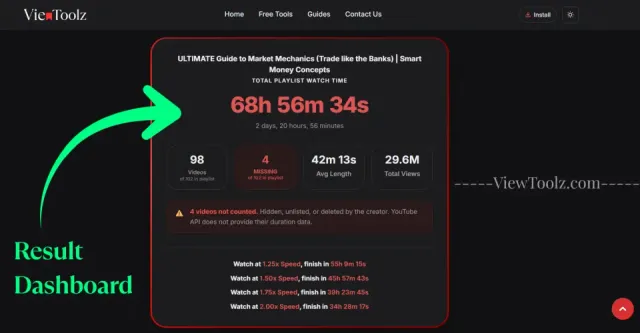
"ここに完全な結果ダッシュボードのスクリーンショットを挿入します"
ViewToolzは、すべてのプロセスをシンプルに保つように作られています。アカウントを作成したり、ソフトウェアをインストールしたり、各動画の長さを個別に手動で追加したりする必要はありません。公開されているYouTubeプレイリストのURLを貼り付けるだけで、計算ツールが機能します。
計算ツールは一般に公開されているプレイリスト情報を取得します。分析が完了すると、総再生時間、再生速度の見積もり、プレイリストの統計情報、利用できない動画、エクスポートオプションなどの詳細なレポートを受け取ることができます。
分析したいYouTubeプレイリストを開き、ブラウザからそのURLをコピーします。

"プレイリストのURLをコピー"
コピーしたURLを計算ツールのページにあるViewToolzの入力ボックスに貼り付けます。
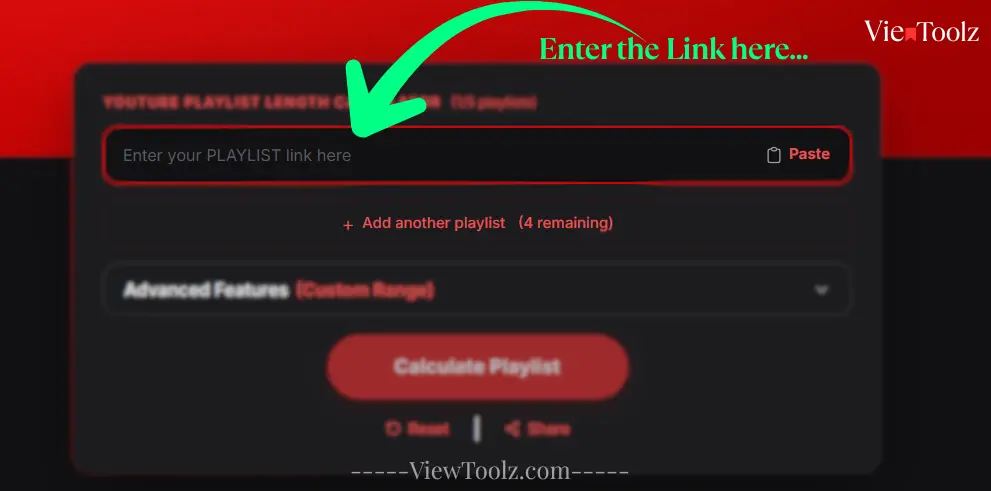
"プレイリストのURLを貼り付け"
ボタンをクリックして分析を開始します。巨大なプレイリストの場合、ViewToolzはリアルタイムで進行状況を表示するため、処理された動画の数を確認できます。
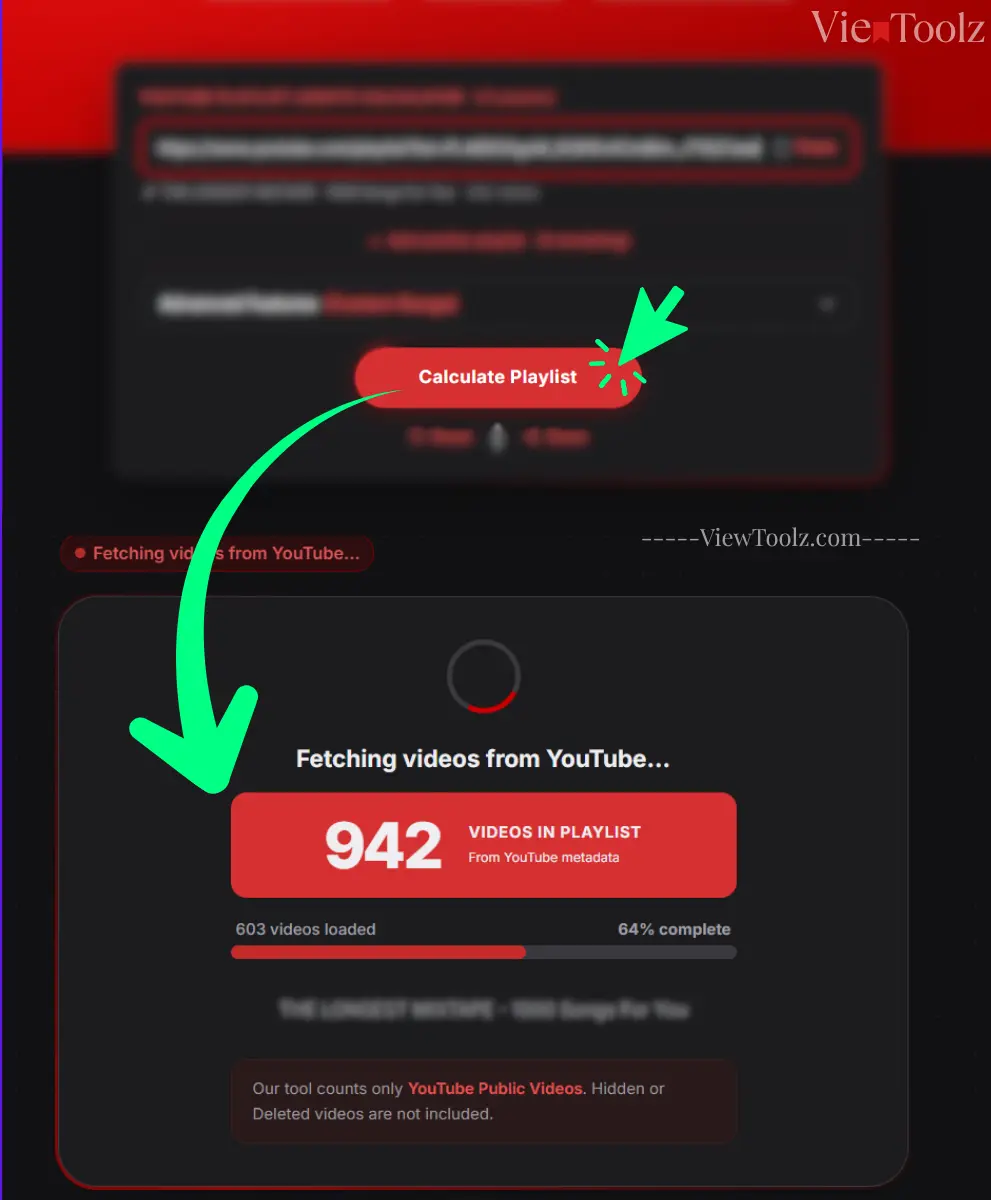
"読み込み進行状況画面"
計算が完了すると、プレイリストの長さ、利用可能および利用不可の動画、再生速度の計算、エンゲージメント指標、比較オプション、およびエクスポートツールが表示されます。
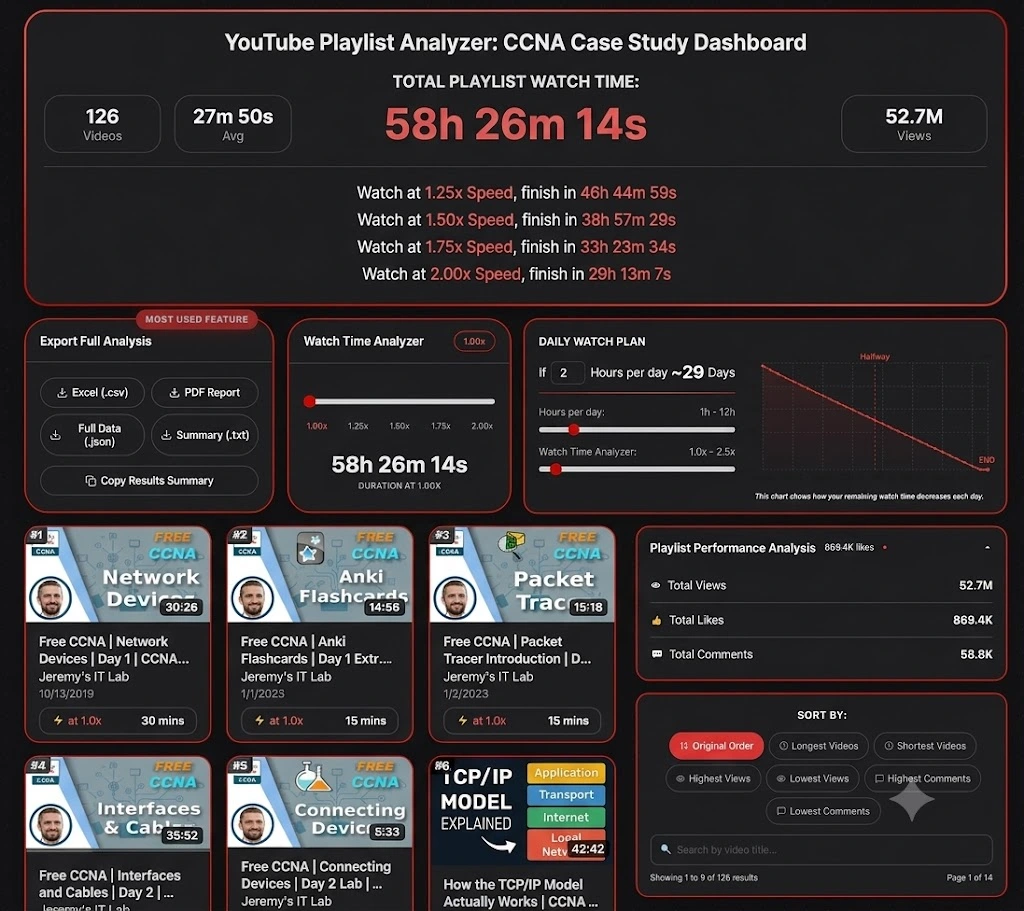
"結果ダッシュボード"
どのプレイリストからテストすればよいか迷っていませんか?テクノロジー、教育、エンターテインメント、音楽業界にわたる、YouTubeで最も人気のあるプレイリストをいくつかご紹介します。これらの例を使用すると、ご自身のプレイリストを分析する前に、ViewToolzが総再生時間、再生速度ごとの見積もり、プレイリストの統計情報、エクスポートオプションをどのように表示するかを確認できます。 (2026年7月14日時点のデータ)
人気のテクノロジープレイリストは、総再生時間、再生速度の計算、プレイリスト分析などのデモンストレーションに最適です。

| 動画総数 | 41 |
| 総再生時間 | 3h 33m |
| 1.25倍速 再生時間 | 2h 50m 47s |
| 1.5倍速 再生時間 | 2h 22m 19s |
| 2倍速 再生時間 | 1h 46m 45s |
| チャンネル | @StephaneMaarek |

| 動画総数 | 126 |
| 総再生時間 | 58時間26分 |
| 1.25倍速 再生時間 | 46時間44分59秒 |
| 1.5倍速 再生時間 | 38時間57分29秒 |
| 2倍速 再生時間 | 29時間13分7秒 |
| チャンネル | @JeremysITLab |

| 動画総数 | 13 |
| 総再生時間 | 26時間22分 |
| 1.25倍速 再生時間 | 21時間5分51秒 |
| 1.5倍速 再生時間 | 17時間34分53秒 |
| 2倍速 再生時間 | 13時間11分10秒 |
| チャンネル | @cs50 |

| 動画総数 | 74 |
| 総再生時間 | 35時間49分 |
| 1.25倍速 再生時間 | 28時間39分56秒 |
| 1.5倍速 再生時間 | 23時間53分17秒 |
| 2倍速 再生時間 | 17時間54分58秒 |
| チャンネル | @mitocw |

| 動画総数 | 100 |
| 総再生時間 | 24時間28分 |
| 1.25倍速 再生時間 | 19時間34分45秒 |
| 1.5倍速 再生時間 | 16時間18分57秒 |
| 2倍速 再生時間 | 12時間14分13秒 |
| チャンネル | @TEDx |

| 動画総数 | 199 |
| 総再生時間 | 45時間23分 |
| 1.25倍速 再生時間 | 36時間18分39秒 |
| 1.5倍速 再生時間 | 30時間15分33秒 |
| 2倍速 再生時間 | 22時間41m 40秒 |
| チャンネル | @ajdm168 |

| 動画総数 | 116 |
| 総再生時間 | 7時間1分 |
| 1.25倍速 再生時間 | 5時間37分3秒 |
| 1.5倍速 再生時間 | 4時間40分53秒 |
| 2倍速 再生時間 | 4時間40分53秒 |
| チャンネル | @NoCopyrightSounds |

| 動画総数 | 69 |
| 総再生時間 | 5時間24分 |
| 1.25倍速 再生時間 | 4時間19分12秒 |
| 1.5倍速 再生時間 | 3時間36分0秒 |
| 2倍速 再生時間 | 2時間42分0秒 |
| チャンネル | @Kassiapiano |
学習を開始するにあたって、2つ以上のYouTubeプレイリストから選択するのは非常に困難です。特に、どちらのプレイリストにも数十から数百の動画が含まれている場合はなおさらです。ViewToolzを使用すると、最大5つの公開YouTubeプレイリストを無料で並べて比較できるため、利用可能な時間に合い、学習目標を達成できるものを簡単に決定できます。
毎回複数のブラウザタブを開いて各プレイリストを個別に計算する代わりに、総再生時間、動画数、再生速度ごとの見積もり、およびその他の統計情報を、ViewToolzの単一の比較ビューだけで確認できます。
| Metric | AWS Tutorials (2026年7月14日時点のデータ) | CS50x 2025 Lectures (2026年7月14日時点のデータ) | 100 must-watch TEDx talks (2026年7月14日時点のデータ) | MrBeast Video Playlist (2026年7月14日時点のデータ) | NCS: The Top 50 Biggest Songs (2026年7月14日時点のデータ) |
|---|---|---|---|---|---|
| 動画総数 | 41 (of 41) | 13 (of 13) | 100 (of 100) | 199 (of 204) | 116 (of 120) |
| 总再生時間 | 3h 33m 0s | 26h 22m 19s | 24h 28m 26s | 45h 23m 19s | 7h 1m 19s |
| 1.25倍速 再生時間 | 2h 50m 47s | 21h 5m 51s | 19h 34m 45s | 36h 18m 39s | 5h 37m 3s |
| 1.5倍速 再生時間 | 2h 22m 19s | 17h 34m 53s | 16h 18m 57s | 30h 15m 33s | 4h 40m 53s |
| 1.75倍速 再生時間 | 2h 1m 43s | 15h 4m 11s | 13h 59m 6s | 25h 56m 11s | 4h 0m 45s |
| 2倍速 再生時間 | [1h 46m 45s] | 13h 11m 10s | 12h 14m 13s | 22h 41m 40s | 3h 30m 40s |
| 利用不可動画 | 0 | 0 | 0 | 5 | 4 |
| 平均動画の長さ | 5m 12s | 2h 1m 43s | 14m 41s | 13m 41s | 3m 38s |
| 総視聴回数 | 8.5M | 5.8M | 437.4M | 23.1B | 8.1B |
無料のプレイリスト比較機能は、コースやシリーズに貴重な時間を費やす前に、十分な情報に基づいて決定を下したい学生、社会人、教育者、ソーシャルメディアコンテンツクリエイターにとって常に役立ちます。プレイリストを並べて比較することで、動画数だけでなく、スケジュールに最も適したプレイリストを選択できます。
ViewToolzは、数本の動画から、YouTubeがサポートする最大のプレイリストサイズである(2026年7月12日現在の)プレイリストあたり5,000本の制限までのYouTubeプレイリストを分析するように設計されています。短いチュートリアルシリーズであれ、膨大な学習動画であれ、この計算ツールは公開プレイリスト全体を処理し、1つの詳細なレポートで結果を提供するように設計されています。
大規模なプレイリストには、常に数百または数千の動画が含まれています。計算を開始した後、プレイリストの計算がまだ実行されているかどうか不安にさせる代わりに、このツールはリアルタイムの進行状況を表示し、処理された動画の数と残りの数を表示します。ロード中の進行状況バーはリアルタイムで更新され、これまでに完了した動画の割合と、まさにその瞬間に処理されている現在の動画番号が表示されます。これにより、プレイリストの分析中に何が起こっているかをユーザーが理解しやすくなります。
現在、YouTubeでは各プレイリストに最大5,000本の動画しか登録できないため、現時点ではその制限に合わせてツールが構築されています。つまり、最大の公開プレイリストであっても、自分で小さなチャンクに分割することなく分析できます。YouTubeがその制限を増やした(または変更した)場合は、簡単に対応できるようにツールを更新します。
その後、プレイリストに関するすべての統計が表示されます。プレイリストに含まれる動画数、利用可能および利用不可の動画数、プレイリストの総再生時間、エクスポートオプション、デイリーウォッチプラン、動画と統計のライブデータチャート、最長動画、コメントの多い動画、視聴回数の少ない動画などのさまざまなフィルターオプションが表示されます。
| 機能 | ViewToolz |
|---|---|
| 最大プレイリストサイズ | 最大5,000本の動画 |
| 処理のフィードバック | ライブ進行状況 |
| 利用不可動画 | 明確にレポート |
| 結果 | プレイリストの完全な概要 |
| データソース | 公式YouTube Data API v3 |
動画の再生速度を調整することで、大規模なYouTubeプレイリストの完了にかかる時間を大幅に短縮できます。ViewToolzは、さまざまな再生速度での総再生時間を自動的に計算するため、好みの視聴スタイルに基づいてプレイリスト全体を確認するのにかかる時間を決定できます。デフォルトでは、このツールは以下のような一般的な再生速度での総再生時間を表示します。
| 再生速度 | 完了時間 |
|---|---|
| 1.25x Speed | 46h 44m 59s |
| 1.50x Speed | 38h 57m 29s |
| 1.75x Speed | 33h 23m 34s |
| 2.00x Speed | 29h 13m 7s |
手動で差を計算する代わりに、このツールはサポートされているすべての再生速度について更新された完了時間を即座に表示します。これにより、結果ページから移動することなく、学習セッション、トレーニングスケジュール、ワークアウト、またはエンターテインメントの計画を簡単に作成できます。
ViewToolzは、すべての標準的なYouTube再生速度をサポートしており、複数の再生オプションを持つ内蔵の速度スライダーを使用して、より柔軟に見積もることもできます。
| 再生速度 | 目的 |
|---|---|
| 1× | 通常の視聴 |
| 1.25× | 快適な学習速度 |
| 1.5× | オンラインコースで人気 |
| 1.75× | 迅速な復習セッション |
| 2× | YouTubeの最大再生速度 |
| Custom Slider | 好みの速度を使用して再生時間を見積もる |
プレイリストを分析した後、結果を保存したり、他のユーザーと共有したり、データをさらに活用したい場合があります。ViewToolzを使用すると、プレイリストの分析結果を5つの異なる形式でエクスポートできるため、学習計画、レポート作成、ドキュメント作成、または個人用の参照に情報を簡単に使用できます。
各エクスポートオプションは、異なる目的に合わせて設計されています。印刷可能なレポート、分析用のスプレッドシート、開発者向けの構造化ファイルなど、プレイリストを再計算することなく、ワークフローに最適な形式をダウンロードできます。
| 形式 | 最適な用途 | 説明 |
|---|---|---|
| CSV (.csv) | Excel & Google スプレッドシート | ソート、フィルタリング、分析のために、プレイリストデータをスプレッドシートにインポートします。 |
| PDF レポート | 印刷と共有 | オフラインでの閲覧や共有のために、プロフェッショナルなレポートを作成します。 |
| JSON (.json) | 開発者 | 統合や自動化のための構造化されたプレイリストデータ。 |
| サマリー (.txt) | クイックリファレンス | 軽量なテキスト形式のサマリーを保存します。 |
| サマリーをコピー | 即座の共有 | 結果をクリップボードに直接コピーします。 |
Knowing the total playlist duration is only part of the picture. But, ViewToolz also provides useful playlist statistics and engagement metrics that help you understand the structure and popularity of a playlist before you start watching and learning. These insights make it easier to evaluate a playlist without opening every video individually.
| Metric | Why It Matters |
|---|---|
| Total Videos | See how many videos are included in the playlist. |
| Available Videos | Videos successfully analysed and included in the calculation. |
| Unavailable Videos | Private, deleted, or unavailable videos reported separately. |
| Total Duration | Combined watch time for all available videos. |
| Average Video Length | Understand the typical lesson or video length. |
| Total Views | See the combined popularity of the playlist where available. |
| Likes | Review engagement where publicly available. |
| Comments | Understand audience interaction where available. |
A long YouTube playlist can feel overwhelming until you break it into smaller daily goals. The Daily Watch Planner feature in ViewToolz helps you estimate how many days it will take you to finish a playlist based on the amount of time you can watch each day.
We also have the Live chart feature for you to see exactly how long it will take to finish your playlist. You can adjust your daily watch time and playback speed, and the chart updates instantly to show your remaining watch time and estimated completion date.
Choose the amount of time you can realistically dedicate each day. ViewToolz will calculate the number of days required to complete the whole playlist and update the schedule automatically as your viewing time changes.
If you find that the total number of videos in your results is shown less than what is displayed in the playlist on YouTube, Please don't worry; because the tool hasn't skipped any of the videos The real reason is there are some videos that cannot be analyzed because YouTube does not make their duration or metadata publicly accessible through the official YouTube Data API.
ViewToolz effectively separates all the available videos from those that are unavailable at that moment, ensuring you always know accurately how many videos were included in the calculation and the reasons for any exclusions. In this way, you can always understand the final watch time without having to wonder if the calculation is complete or not.
| Reason | Explanation |
|---|---|
| Private Videos | The uploader has made the video private, so YouTube no longer provides public access. |
| Deleted Videos | The original video has been removed from YouTube and can no longer be analysed. |
| Unavailable Videos | Some videos are restricted or unavailable in your region or account. |
| Removed Content | Videos removed because of copyright claims or policy violations are excluded. |
| API Limitations | If YouTube does not return duration information through the official API, the video cannot be included in the total watch time. |
Instead of silently ignoring all the unavailable videos in the end report like other tools, ViewToolz reports and highlights them separately in the results dashboard for you to clearly see it. This gives you a clearer understanding of the missing playlist videos and helps explain why the total watch time may differ from the number of videos displayed on YouTube.
ViewToolz retrieves publicly available playlist information using the official YouTube Data API v3. Using YouTube's official developer platform helps provide consistent and up-to-date playlist information without relying on unofficial scraping methods or outdated databases.
Every time you calculate a playlist, ViewToolz requests the latest publicly available data directly from YouTube. If a playlist changes because videos are added, removed, or made private, recalculating the playlist will reflect those public changes on the report dashboard.
| Benefit | What It Means |
|---|---|
| Official Data Source | Information comes from YouTube's official developer API. |
| Current Public Data | Results reflect the latest publicly available playlist information. |
| Reliable Calculations | Watch time is calculated from video durations returned by YouTube. |
| Transparent Reporting | Unavailable videos are reported instead of silently ignored. |
| Future Updates | Recalculate any time to refresh playlist information. |
These are some of the most common questions users have about calculating YouTube playlist duration with ViewToolz.
Yes. You can calculate public YouTube playlist duration without creating an account.
No. No login or registration is required.
ViewToolz supports public playlists with up to 5,000 videos, which is YouTube's maximum playlist size.
No. Only publicly accessible playlists can be analysed.
Private, deleted, or unavailable videos cannot be fully analysed because YouTube does not provide their data publicly.
ViewToolz uses the official YouTube Data API v3 to retrieve publicly available playlist information.
Yes. Compare up to five playlists side by side.
Yes. Export as CSV, PDF, JSON, TXT, Xlsx or copy a summary.
Yes. ViewToolz estimates watch time at multiple playback speeds.
Yes. The calculator works on mobile, desktop and all the operating system's browsers.
No, You need to recalculate the playlist anytime to fetch the latest public information.
No. ViewToolz analyzes your playlist in real time. There's no account required, and we don't save your playlist data after the analysis.
Unavailable videos may not be included because YouTube does not provide their duration publicly.
Yes, any supported public YouTube playlist can be analysed.
Yes. It's useful for AWS, CCNA, CS50, Python, and many other courses.
Yes, use the playback speed controls for flexible estimates.
Xlsx and CSV are Available
Yes.
Yes, export them as a PDF.
No, Public playlists can be analysed whenever needed.
Yes. We mention at the top of the report/
Yes, use the Daily Watch Planner.
It saves time and provides additional statistics in one report.
No.But we have options for that too.
All Modern desktop and mobile browsers.
Yes, any supported public YouTube Podcasts playlist can be analysed.
Yes.We do have
1本から5,000本以上の動画まで。即座に詳細分析。
YouTube プレイリスト再生時間計算機(1/5 個のリスト)
複数のプレイリストを取得するには、クイック認証を完了してください。
