
Supports up to 5,000 videos, custom playback speeds, missing video detection, and comparison of up to 5 playlists at once.
ViewToolz is a free tool created for anyone who wants to know exactly how long a YouTube playlist will take to completely watch. Whether you are studying for any online certifications, following a free online youtube course, listening to the music, or researching content, our tool gives you a complete playlist analysis in one place where you can see whole data of this playlist for free.
Instead of showing only the total duration of the playlists, ViewToolz will show and help you understand the entire playlists complete data. Our tool supports youtube playlists with up to 5,000 videos and it compares multiple playlists side by side for the free of cost, calculates watch time at different playback speeds, identifies the unavailable videos, and lets you export results in five different formats at zero cost.
ViewToolz uses all the publicly available playlist information fetched using the official YouTube Data API v3, Using this method helps our tool make sure the results are up to date with the latest information from YouTube.
| Feature | Details |
|---|---|
| Maximum Playlist Size | 5,000 Videos |
| Playlist Comparison | Up to 5 Playlists |
| Export Formats | CSV, PDF, JSON, TXT, Copy Summary |
| Login | No Login Required |
| Data Source | Official YouTube Data API v3 |
| Playback Speed | Supported |
| Missing Videos | Yes, Missing videos Shown |
| Daily Watch Plan | Watch time analyzer with Custom Graphs |
| Playlist Performance Analysis | Total views, Likes, Comments |
| Sorting Options | 7 Free sorting options included |
| Which Type of Playlists supported | All types including, Music, Normal Videos, More importantly Youtube Podcast's too. |
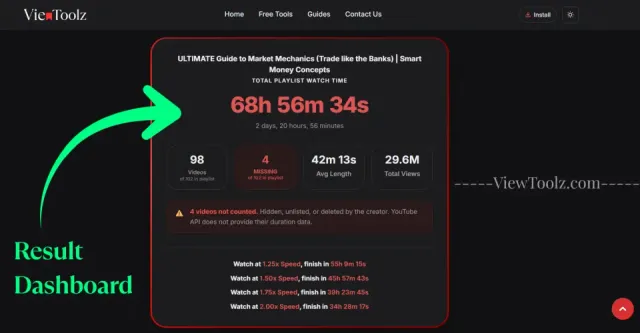
"Full Results Dashboard"
ViewToolz is created in a way to keep all the processes simple. You don't need to create any account, install any software, or manually add the duration of every video separately. Just paste a public YouTube playlist URL and let the calculator do the work.
The calculator retrieves publicly available playlist information Once the analysis is complete, you'll receive a detailed report with total watch time, playback speed estimates, playlist statistics, unavailable videos, and export options, many more.
Open the YouTube playlist you want to analyse and copy its URL from your browser.

"Copy playlist URL"
Paste the copied URL into the ViewToolz input box on the calculator page.
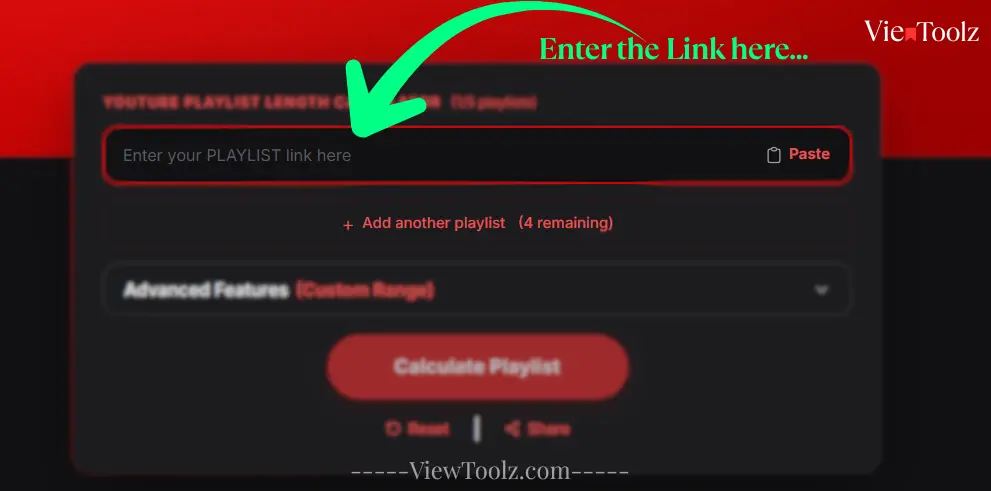
"Paste playlist URL"
Click the button to begin the analysis. For large playlists, ViewToolz displays live progress so you can see how many videos have been processed.
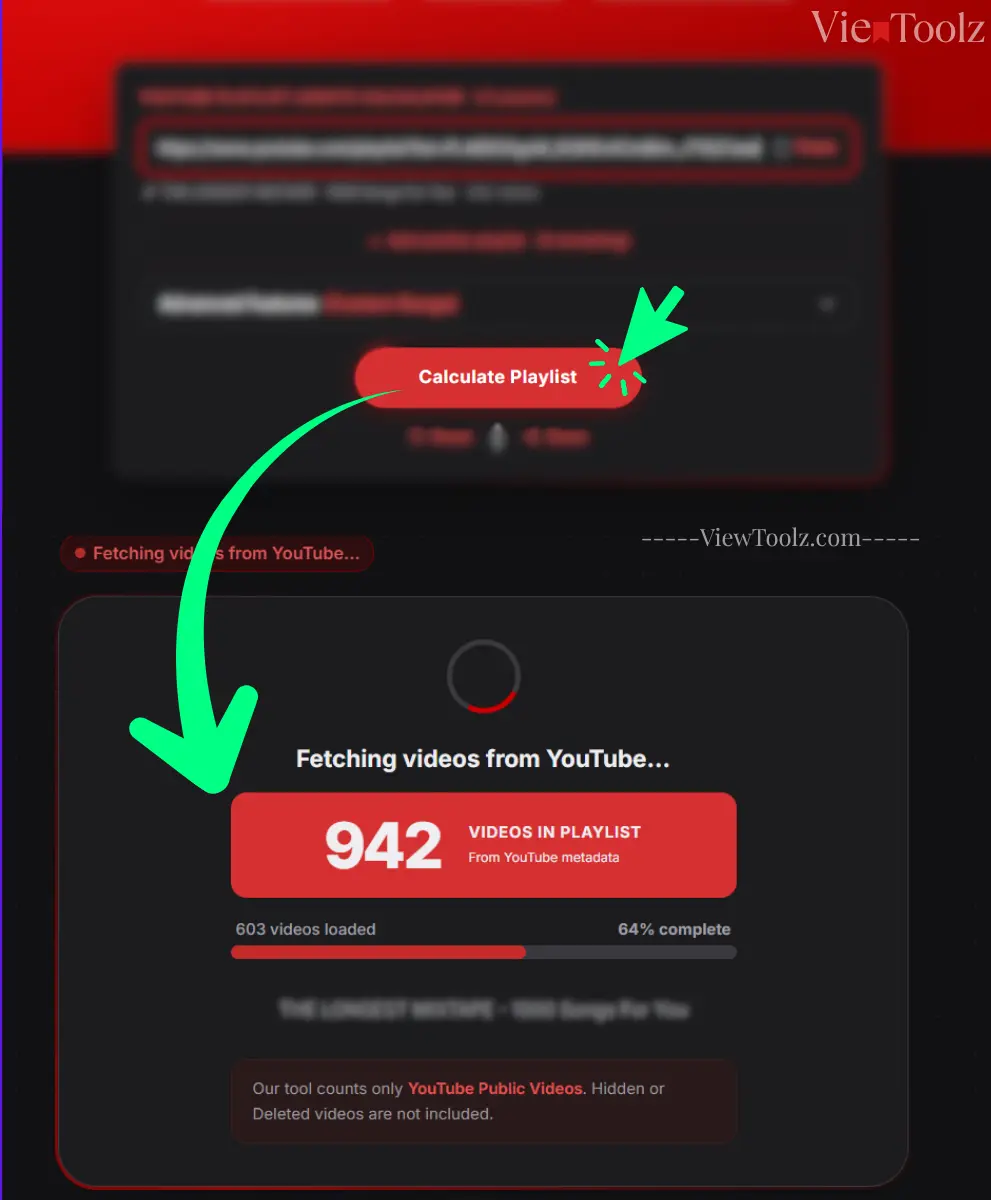
"Loading progress screen"
After the calculation finishes, you'll see the playlist duration, available and unavailable videos, playback speed calculations, engagement metrics, comparison options, and export tools.
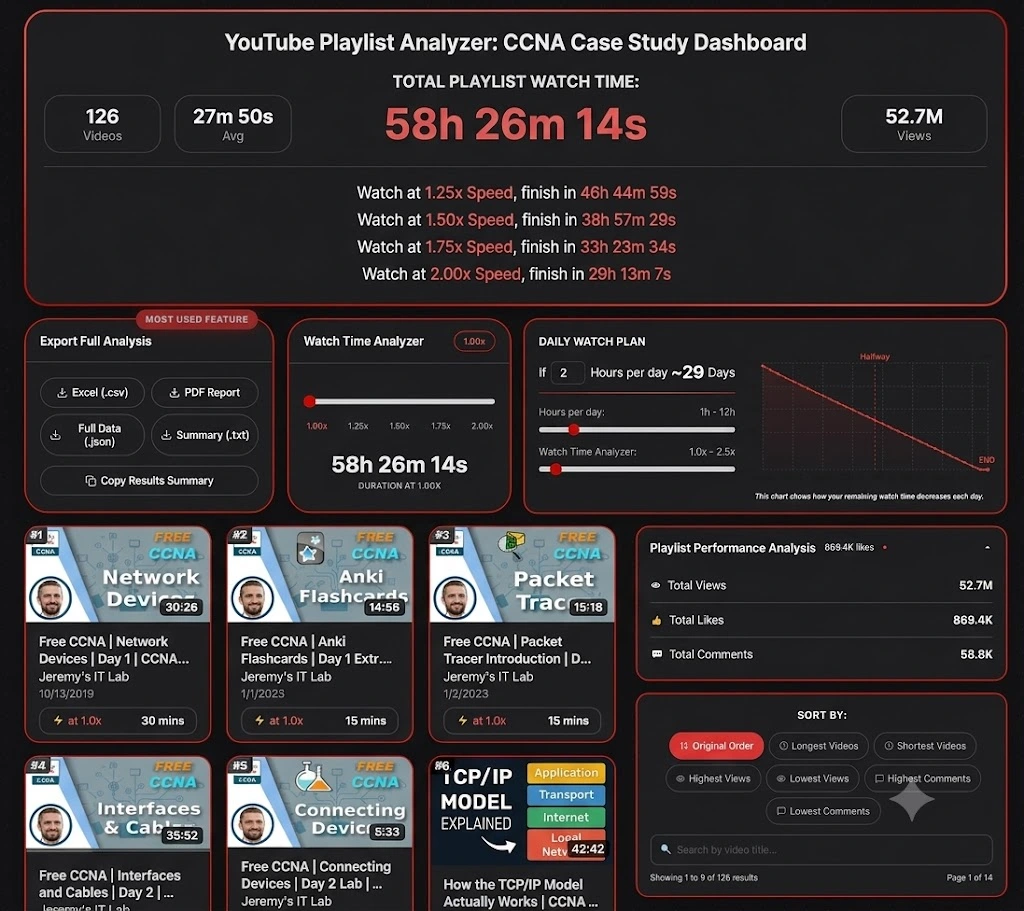
"Results dashboard"
If you are not sure which playlist to test first? Explore some of the YouTube's most popular playlists across technology, education, entertainment, and the music industry. These examples will help you see how ViewToolz presents the watch time, playback speed estimates, playlist statistics, and export options before analyzing your own playlist. (Data as of July 14, 2026)
Popular technology playlists are excellent examples for demonstrating The total duration, playback speed calculations, and playlist analytics etc.

| Total Videos | 41 |
| Total Duration | 3h 33m |
| 1.25× Watch Time | 2h 50m 47s |
| 1.5× Watch Time | 2h 22m 19s |
| 2× Watch Time | 1h 46m 45s |
| Channel | @StephaneMaarek |

| Total Videos | 126 |
| Total Duration | 58h 26m |
| 1.25× Watch Time | 46h 44m 59s |
| 1.5× Watch Time | 38h 57m 29s |
| 2× Watch Time | 29h 13m 7s |
| Channel | @JeremysITLab |

| Total Videos | 13 |
| Total Duration | 26h 22m |
| 1.25× Watch Time | 21h 5m 51s |
| 1.5× Watch Time | 17h 34m 53s |
| 2× Watch Time | 13h 11m 10s |
| Channel | @cs50 |

| Total Videos | 74 |
| Total Duration | 35h 49m |
| 1.25× Watch Time | 28h 39m 56s |
| 1.5× Watch Time | 23h 53m 17s |
| 2× Watch Time | 17h 54m 58s |
| Channel | @mitocw |

| Total Videos | 100 |
| Total Duration | 24h 28m |
| 1.25× Watch Time | 19h 34m 45s |
| 1.5× Watch Time | 16h 18m 57s |
| 2× Watch Time | 12h 14m 13s |
| Channel | @TEDx |

| Total Videos | 199 |
| Total Duration | 45h 23m |
| 1.25× Watch Time | 36h 18m 39s |
| 1.5× Watch Time | 30h 15m 33s |
| 2× Watch Time | 22h 41m 40s |
| Channel | @ajdm168 |

| Total Videos | 116 |
| Total Duration | 7h 1m |
| 1.25× Watch Time | 5h 37m 3s |
| 1.5× Watch Time | 4h 40m 53s |
| 2× Watch Time | 4h 40m 53s |
| Channel | @NoCopyrightSounds |

| Total Videos | 69 |
| Total Duration | 5h 24m |
| 1.25× Watch Time | 4h 19m 12s |
| 1.5× Watch Time | 3h 36m 0s |
| 2× Watch Time | 2h 42m 0s |
| Channel | @Kassiapiano |
Choosing between two or more YouTube playlists to start your course is really difficult, especially when both courses or the playlist contains dozens or hundreds of videos in it. ViewToolz helps you compare up to five public YouTube playlists side by side for free, making it easier for you to decide which one fits your available time and meets your learning goals.
Instead of you opening multiple browser tabs every time and calculating each playlist separately, you can review watch time, video count, playback speed estimates, and other statistics in a single comparison view only in ViewToolz.
| Metric | AWS Tutorials (Data as of July 14, 2026) | CS50x 2025 Lectures (Data as of July 14, 2026) | 100 must-watch TEDx talks (Data as of July 14, 2026) | MrBeast Video Playlist (Data as of July 14, 2026) | NCS: The Top 50 Biggest Songs (Data as of July 14, 2026) |
|---|---|---|---|---|---|
| Total Videos | 41 (of 41) | 13 (of 13) | 100 (of 100) | 199 (of 204) | 116 (of 120) |
| Total Duration | 3h 33m 0s | 26h 22m 19s | 24h 28m 26s | 45h 23m 19s | 7h 1m 19s |
| 1.25× Watch Time | 2h 50m 47s | 21h 5m 51s | 19h 34m 45s | 36h 18m 39s | 5h 37m 3s |
| 1.5× Watch Time | 2h 22m 19s | 17h 34m 53s | 16h 18m 57s | 30h 15m 33s | 4h 40m 53s |
| 1.75× Watch Time | 2h 1m 43s | 15h 4m 11s | 13h 59m 6s | 25h 56m 11s | 4h 0m 45s |
| 2× Watch Time | [1h 46m 45s] | 13h 11m 10s | 12h 14m 13s | 22h 41m 40s | 3h 30m 40s |
| Unavailable Videos | 0 | 0 | 0 | 5 | 4 |
| Average Video Length | 5m 12s | 2h 1m 43s | 14m 41s | 13m 41s | 3m 38s |
| Total Views | 8.5M | 5.8M | 437.4M | 23.1B | 8.1B |
The free Playlist comparison feature is always useful for the students, working professionals, educators, and social media content creators who want to make informed decisions before putting their precious time and hours in a course or series. By comparing the playlists side by side, they can better choose the one that matches their schedule, not just by the number of videos in that playlist.
ViewToolz is designed to analyze YouTube playlists ranging from a few videos to the maximum playlist size supported by YouTube, which is 5000 videos limit per playlist as of July 12th, 2026. Whether you're looking at a short tutorial series or a massive learning video, this calculator is designed to process the whole complete public playlist and provide the results in a single detailed report.
Large playlists always have hundreds or thousands of videos in it. After you start the calculation, instead of leaving you wondering whether the playlist calculation is still running, our tool displays the real time progress, which will be showing you how many videos have been processed and how many those that are left. Those loading progress bar updates in the real time, displaying the percentage of the videos completed so far and the current video number being processed at the very moment. This makes users easier to understand what is happening while the playlist is being analysed.
Right now, YouTube allows each playlist to have up to 5,000 videos only, so that's the limit our tool is built around at this moment. Which means you can analyze even the biggest public playlists without having to split them into smaller chunks by yourself. If YouTube ever increases (or changes) that limit, we will update our tool to support it too without breaking a sweat.
After that you will see all the stats about the playlists. How many video that playlist has, how many available and unavailable videos, total duration of that playlist, Export options, Daily watch plans, Live data chart of the videos and stats, different filter options like longest videos, most commented videos, lease viewed videos etc,
| Capability | ViewToolz |
|---|---|
| Maximum Playlist Size | Up to 5,000 Videos |
| Processing Feedback | Live Progress |
| Unavailable Videos | Clearly Reported |
| Results | Complete Playlist Summary |
| Data Source | Official YouTube Data API v3 |
By adjusting the playback speeds of the videos, you can mostly shorten the whole time it takes to complete a large YouTube playlist. ViewToolz automatically calculates the total watch time at different playback speeds, helping you to decide how long it will take to go through the whole playlist based on your preferred viewing styles. By default, our tool displays the total watch time at popular playback speeds, like
| Playback Speed | Finish Time |
|---|---|
| 1.25x Speed | 46h 44m 59s |
| 1.50x Speed | 38h 57m 29s |
| 1.75x Speed | 33h 23m 34s |
| 2.00x Speed | 29h 13m 7s |
Instead of users calculating the difference manually, our tool instantly shows all the updated completion times for every supported playback speed. This makes it easier to plan study sessions, training schedules, workouts, or entertainment without leaving the results page.
ViewToolz supports all the standard YouTube playback speeds and also allows you to use the built-in speed slider for more flexible estimates, which has multiple playback options..
| Playback Speed | Purpose |
|---|---|
| 1× | Normal viewing |
| 1.25× | Comfortable learning speed |
| 1.5× | Popular for online courses |
| 1.75× | Fast review sessions |
| 2× | Maximum YouTube playback speed |
| Custom Slider | Estimate watch time using your preferred speed |
After analysing a playlist, you may want to save the results, share them with others, or continue working with the data. ViewToolz lets you export your playlist analysis in five different formats, making it easy to use the information for study planning, reporting, documentation, or personal reference.
Each export option is designed for a different purpose. Whether you need a printable report, a spreadsheet for analysis, or a structured file for developers, you can download the format that best fits your workflow without recalculating the playlist.
| Format | Best For | Description |
|---|---|---|
| CSV (.csv) | Excel & Google Sheets | Import playlist data into spreadsheets for sorting, filtering, and analysis. |
| PDF Report | Printing & Sharing | Generate a professional report for offline viewing or sharing. |
| JSON (.json) | Developers | Structured playlist data for integrations and automation. |
| Summary (.txt) | Quick Reference | Save a lightweight text summary. |
| Copy Summary | Instant Sharing | Copy results directly to your clipboard. |
Knowing the total playlist duration is only part of the picture. But, ViewToolz also provides useful playlist statistics and engagement metrics that help you understand the structure and popularity of a playlist before you start watching and learning. These insights make it easier to evaluate a playlist without opening every video individually.
| Metric | Why It Matters |
|---|---|
| Total Videos | See how many videos are included in the playlist. |
| Available Videos | Videos successfully analysed and included in the calculation. |
| Unavailable Videos | Private, deleted, or unavailable videos reported separately. |
| Total Duration | Combined watch time for all available videos. |
| Average Video Length | Understand the typical lesson or video length. |
| Total Views | See the combined popularity of the playlist where available. |
| Likes | Review engagement where publicly available. |
| Comments | Understand audience interaction where available. |
A long YouTube playlist can feel overwhelming until you break it into smaller daily goals. The Daily Watch Planner feature in ViewToolz helps you estimate how many days it will take you to finish a playlist based on the amount of time you can watch each day.
We also have the Live chart feature for you to see exactly how long it will take to finish your playlist. You can adjust your daily watch time and playback speed, and the chart updates instantly to show your remaining watch time and estimated completion date.
Choose the amount of time you can realistically dedicate each day. ViewToolz will calculate the number of days required to complete the whole playlist and update the schedule automatically as your viewing time changes.
If you find that the total number of videos in your results is shown less than what is displayed in the playlist on YouTube, Please don't worry; because the tool hasn't skipped any of the videos The real reason is there are some videos that cannot be analyzed because YouTube does not make their duration or metadata publicly accessible through the official YouTube Data API.
ViewToolz effectively separates all the available videos from those that are unavailable at that moment, ensuring you always know accurately how many videos were included in the calculation and the reasons for any exclusions. In this way, you can always understand the final watch time without having to wonder if the calculation is complete or not.
| Reason | Explanation |
|---|---|
| Private Videos | The uploader has made the video private, so YouTube no longer provides public access. |
| Deleted Videos | The original video has been removed from YouTube and can no longer be analysed. |
| Unavailable Videos | Some videos are restricted or unavailable in your region or account. |
| Removed Content | Videos removed because of copyright claims or policy violations are excluded. |
| API Limitations | If YouTube does not return duration information through the official API, the video cannot be included in the total watch time. |
Instead of silently ignoring all the unavailable videos in the end report like other tools, ViewToolz reports and highlights them separately in the results dashboard for you to clearly see it. This gives you a clearer understanding of the missing playlist videos and helps explain why the total watch time may differ from the number of videos displayed on YouTube.
ViewToolz retrieves publicly available playlist information using the official YouTube Data API v3. Using YouTube's official developer platform helps provide consistent and up-to-date playlist information without relying on unofficial scraping methods or outdated databases.
Every time you calculate a playlist, ViewToolz requests the latest publicly available data directly from YouTube. If a playlist changes because videos are added, removed, or made private, recalculating the playlist will reflect those public changes on the report dashboard.
| Benefit | What It Means |
|---|---|
| Official Data Source | Information comes from YouTube's official developer API. |
| Current Public Data | Results reflect the latest publicly available playlist information. |
| Reliable Calculations | Watch time is calculated from video durations returned by YouTube. |
| Transparent Reporting | Unavailable videos are reported instead of silently ignored. |
| Future Updates | Recalculate any time to refresh playlist information. |
These are some of the most common questions users have about calculating YouTube playlist duration with ViewToolz.
Yes. You can calculate public YouTube playlist duration without creating an account.
No. No login or registration is required.
ViewToolz supports public playlists with up to 5,000 videos, which is YouTube's maximum playlist size.
No. Only publicly accessible playlists can be analysed.
Private, deleted, or unavailable videos cannot be fully analysed because YouTube does not provide their data publicly.
ViewToolz uses the official YouTube Data API v3 to retrieve publicly available playlist information.
Yes. Compare up to five playlists side by side.
Yes. Export as CSV, PDF, JSON, TXT, Xlsx or copy a summary.
Yes. ViewToolz estimates watch time at multiple playback speeds.
Yes. The calculator works on mobile, desktop and all the operating system's browsers.
No, You need to recalculate the playlist anytime to fetch the latest public information.
No. ViewToolz analyzes your playlist in real time. There's no account required, and we don't save your playlist data after the analysis.
Unavailable videos may not be included because YouTube does not provide their duration publicly.
Yes, any supported public YouTube playlist can be analysed.
Yes. It's useful for AWS, CCNA, CS50, Python, and many other courses.
Yes, use the playback speed controls for flexible estimates.
Xlsx and CSV are Available
Yes.
Yes, export them as a PDF.
No, Public playlists can be analysed whenever needed.
Yes. We mention at the top of the report/
Yes, use the Daily Watch Planner.
It saves time and provides additional statistics in one report.
No.But we have options for that too.
All Modern desktop and mobile browsers.
Yes, any supported public YouTube Podcasts playlist can be analysed.
Yes.We do have
From 1 video to 5,000+. Full analysis instantly.
YouTube Playlist Length Calculator(1/5 playlists)
To fetch multiple playlists, please complete a quick verification.
